Showing posts sorted by relevance for query bluetooth. Sort by date Show all posts

Saturday, January 17, 2009

Choosing the Best Bluetooth headset gadgets

Wanting to be on hands free device with Bluetooth headset enabled phones- this posts can act as a basic guide to you. Best devices for you (crème de la crème) can be purchased from Amazon. The choice is again yours whether you want a single ear piece or the both.

Motorola S9 Bluetooth Active Headphones
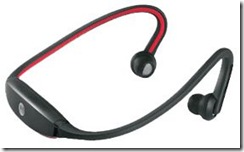
Motorola S9 Bluetooth Active Headphones

One of the best designs, user-friendly controls, better sound quality, built-in microphone for making phone calls


Jabra BT620s - Bluetooth Stereo Headset

Jabra BT620s - Bluetooth Stereo Headset

best to listen music and make phone calls,  play music from your laptop directly on Jabra Bluetooth Stereo Headset

Plantronics Voyager 520

Plantronics Voyager 520 

lightweight, comfortable, very good call quality, relatively cheaper

Plantronics Voyager 510 with Multipoint Technology

Plantronics Voyager 510 with Multipoint Technology

Lightweight, versatile headset, wearing comfort, clearer voice transmission, superior sound quality, deskphone adapter

Samsung WEP200 Black
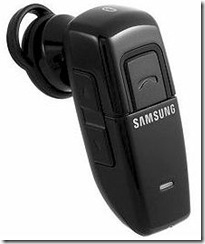
Samsung WEP200 Black

compact ear-but Bluetooth headset, cozy buttons, adaptation needed to use

Aliph Jawbone and Jawbone 2

Aliph Jawbone and Jawbone 2

modern finishing, ear comfortable, noise-cancelling technology that senses vibrations in jaw to verify if the sound is coming from the user, best sound quality, no simpler volume changer

Motorola H 98689 T820 Bluetooth Stereo Headset
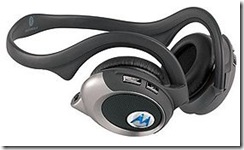
Motorola H 98689 T820 Bluetooth Stereo Headset

ultimate choice of audiophiles, music and phone calls seamlessly streamed, A2DP (Advanced Audio Distribution Profile) & AVRCP (Audio Video Remote Control Profile) allow to stream music directly from laptop/PC, most PMPs including MP3,MP4 players

Sony Ericsson Bluetooth HBH-GV435

Sony Ericsson Bluetooth HBH-GV435

Sony's best Bluetooth headset using DSP (Digital Signal Processing) technology, clear sound, almost all sorts of noise canceled out, fast, automatic volume adjustment, auto pairing and redialing

Other worth mentioning Bluetooth headset/stereo devices include:

  • SoundID SM100 Bluetooth headset
  • Plantronics Voyager 855 Bluetooth headset
  • BlueAnt V1
  • Jabra BT8040

Further Links:

Sunday, January 04, 2009

Bluetooth wireless technology- maximizing use of Windows Vista's inbuilt Bluetooth features

Bluetooth technology uses radio transmissions to enable devices such as computers, printers, mice, or mobile phones to communicate wirelessly over a short distance. Some of the ways to use Bluetooth technology are:

  • To transfer files between computers or between a computer and another device

  • To print using a Bluetooth enabled wireless printer

  • To use a Bluetooth enabled wireless keyboard or mouse

  • To listen to music using Bluetooth enabled wireless headphones

  • To synchronize a Bluetooth enabled personal digital assistant (PDA) to a computer or another device

  • To create a wireless connection to the Internet with a Bluetooth enabled mobile phone or a modem server

  • To join a Bluetooth personal area network (PAN)

After successful installation of your Bluetooth devices ie Bluetooth mobile phone, Bluetooth printer or any other Bluetooth enabled computer peripherals, make proper arrangements for passkey and encryption, if your Bluetooth device support and you really want that. Encryption features and a passkey can help to secure your data. However, these and other security measures can be compromised or fail and, if that happens, your data could be visible to or accessible by other devices or computers within range. Therefore, Bluetooth wireless technology should not be considered completely secure.

You can also Use a Bluetooth hands-free device or headphones or sync the Bluetooth devices with Windows Media Player or automatically backup your data with your devices. This is very easily done task and should take no time of yours.

For more articles on advantages and usages of Bluetooth devices from this blog, please click here to search.

Friday, April 24, 2009

New Bluetooth 3.0 devices to hit market later this year ‘09

The Bluetooth Special Interest Group (SIG) has recently announced the new Bluetooth 3.0 standard to boost wireless data transfer between devices to 24Mbps from the recent data transfer rate of just 3Mbps for Bluetooth 2.1 standards. In fact, the Bluetooth 3.0 specification is an update from the Bluetooth 2.1 protocol, which was adopted by the group in 2007. bluetooth-3.0-logo

A standards group has approved specifications for a new Bluetooth standard that speeds up wireless data transfers between devices like smart phones and laptops. Bluetooth is commonly used to pair mobile phones with wireless headsets for hands-free talking. It is also used to connect a mobile phone to a laptop to synchronize data or transfer multimedia files without using wires. Over 2 billion devices have shipped with Bluetooth built in, according to Bluetooth SIG report.

The adoption of the standard, and devices based on the Bluetooth 3.0 specification could ship later this year ‘09 or by early next year ‘10 near the holiday season. However, post specification adoption might delay the products on the market. The faster data transfers could lead to its adoption in a number consumer electronics devices beyond just mobile phones.

The Bluetooth SIG has expected Bluetooth 3.0 to make its way into PCs, mobile phones, camcorders, cameras, TVs, digital presenters - devices that consumers use to transfer large data files like those of video, photographs and even entire music libraries.

The standard enables faster data transfers while using less power, giving consumers improved responsiveness and better battery life in mobile devices. It also stabilizes connections between devices, ironing out kinks from earlier standards when connections broke after a device like a cell phone was placed in the pocket. The Bluetooth 3.0 radio is based on Wi-Fi standards, which enables better data throughput while delivers power-saving benefits for mobile devices. It uses short bursts of Wi-Fi to send data, after which the radio is shut off until it is needed again.

More about Bluetooth from the Geeklog.

Saturday, January 06, 2007

Bluetooth device connections are slow or stop working

Bluetooth device connections are slow or stop working

If your Bluetooth devices are slow or stop working, check the following:

  • Are the devices the correct distance apart? The devices could be at the edge of their range or too close to each other. Move the devices closer together. If that does not work, move the devices farther apart. Also, read the documentation for the device to determine the correct the transmission range.
  • Is one of the devices too busy? For example, other programs might be connecting to the printer, preventing this connection. To reduce the number of connections, set your other devices so that they are not discoverable.
  • Are other devices interfering? The Bluetooth radio frequency is 2.4 gigahertz (GHz). Other devices might be in the same frequency range as your Bluetooth devices. These can include:
    • Cordless telephones that use the 2.4 GHz range
    • Microwave ovens
    • X10 devices, such as those that control automatic lighting and universal remote controls
    • Wireless networks using the 802.11 standard (also called Wi-Fi networks)

      If you think this is the problem, try moving your Bluetooth device farther from the source of interference.

    If your Bluetooth keyboard or mouse does not work, try the following:

    1. Connect a wired keyboard or mouse to your computer.
    2. Open Bluetooth Devices in Control Panel.
    3. Click the Bluetooth device that is not responding, and then click Remove.
    4. Click Add, select the My device is set up and ready to be found check box, and then click Next. If the device is not found, click Search Again.
    5. When the device is found, select it, and then click Next.
    6. If the device is a keyboard, exchange passkeys with the keyboard.
    7. If the device is a mouse, click Don't use a passkey.
    8. Follow the rest of the instructions in the wizard.

Security might have been reset on either device. This is especially common with keyboards and mice. Other devices can have similar problems and might need to be reinstalled.

Saturday, December 06, 2008

Bluetooth 2.2 Specifications to Be Revealed Next Year

The specifications for the new version of Bluetooth technology- Bluetooth 2.2 will be revealed sometime in mid-2009. This was announced by the consortium of companies that form the technology’s Special Interest Group.

According to the SIG, Bluetooth 2.2 will enable wireless video streaming, printing and other Wi-Fi related tasks. It will also meant that faster speeds than that under v1.1 can be achieved. It is expected that Bluetooth 10x devices will be released first followed by Bluetooth 100x, which if used along with Ultra Wide Broadband radio, may be able to give 480mbps of data transfer speed. Bluetooth 10x is expected to give better performance in Wi-Fi devices and this will be pretty useful especially in portable media players.

The new iPod Touch 2G has a Bluetooth chip embedded in it but it has not yet been activated. Once the final specifications are released, we can expect Apple to release the update to enable Bluetooth 2.2 services.

Monday, November 13, 2006

Installing Bluetooth mobile phone in Windows XP

To install a Bluetooth mobile phone

If your mobile phone can also communicate with your computer over a Bluetooth wireless network to perform tasks such as contact synchronization or file transfer, then use Bluetooth Devices in Control Panel to install your mobile phone.

  1. Attach or turn on the Bluetooth radio adapter for your Windows XP computer.
  2. Set up your mobile phone so that Windows XP can find it. Setting up your phone includes:
    • Turning it on
    • Making it discoverable (or visible)
    • Giving it a name (optional)

    If you are not sure how to set up your phone to make it discoverable, read the documentation for the phone.

  3. Open Bluetooth Devices in Control Panel.
  4. On the Devices tab, click Add.
  5. Follow the steps in the Add Bluetooth Device Wizard.

Saturday, October 04, 2008

Use your computer as a Bluetooth speakerphone

This might be very exiting to hear at first and yes, it's true, it's always the best. Get you Bluetooth equipped mobile phone (Smart Phone or Windows Mobile or Similar PDAs) and your laptop or desktop with Bluetooth adapter handy and set to boost the handsfree freedom with your device. Your computer also need to be furnished with speakers (woofers would be a great pleasure) and a microphone (Use Boost Microphone feature for enhancement from your system Control Panel).

Now you can use your computer as a speakerphone when using with your Bluetooth equipped mobile phone. I'm addicted to it, you might be.

  • Click Start -> Control Panel -> Hardware and Sound -> Bluetooth Devices. (In Windows Vista OS, you might be prompted for Administrative credentials.)
  • On the Devices tab, click Add to add your mobile phone and then follow the wizard steps.
  • On your Mobile phone, enable Hands-free connection with your computer with enabling Bluetooth ON. (For details on using Bluetooth on your mobile phone, please read the documentation of your cell phone.)
  • Now, click Audio tab where you see your mobile phone in the list.
  • Click Telephony Audio Gateway service and then click Connect. When you are finished with the call, click Disconnect.

Thursday, October 02, 2008

Set up a Bluetooth enabled device on your computer and on the mobile device

To set up a Bluetooth enabled device, you need to do three things:

  1. Add a Bluetooth adapter to your computer.

    This is usually done by plugging the adapter into a USB port. (If a Bluetooth adapter is already built in or attached to your computer, ignore this step.)

  2. Set up the device so that your computer can find it.

    To do this, you must:

    • Turn the device on.

    • Make it discoverable.

    To learn how to make a device discoverable, check the information that came with your device or go to the manufacturer’s website.

  3. Install the device.

    To install most devices, such as a mobile phone, keyboard, mouse, or personal digital assistant (PDA), you can use Bluetooth Devices in Control Panel. If you have Bluetooth wireless technology installed on your computer, follow these steps:

Wednesday, December 10, 2008

Service Pack2 (SP2) Beta for Windows Server 2008, Vista Available

Microsoft gave its MSDN and TechNet subscribers access to the beta of Service Pack 2 for Windows Vista and Windows Server 2008 and will make the software available to the general public in a few days from now. The beta includes all the hot fixes that have been released since SP1, which shipped in March. Also included are some new features for corporate users including full integration of Hyper-V into Windows Server 2008.

Microsoft shipped a beta of SP2 in October to a small group of users in its Technology Adoption Program. This week, Microsoft is opening up the testing and plans to release the software next year. "We are tracking to ship Windows Vista SP2 in the first half of 2009," Mike Nash, corporate vice president for Windows product management, announced on the Vista Team blog. The release will come ahead of Windows 7, which some speculate could ship by the end of 2009. Microsoft's official timeframe is Jan. 2010.
The Hyper-V integration includes one free guest license for users of Windows Server 2008 Standard, four free licenses for users of the Enterprise version and an unlimited number of licenses for the DataCenter version.

SP2 also includes the ability to configure power management policies via Group Policy, and improved backward compatibility for older Terminal Server license keys that are only 512 bytes. Other improvements include the addition of Windows Search 4.0; the Bluetooth 2.1 Feature Pack that supports the most recent specification for Bluetooth technology; the ability to record data on to Blu-Ray media natively in Windows Vista; the inclusion of Windows Connect Now (WCN) to simplify Wi-Fi configuration; and the enablement of the exFAT file system to support UTC timestamps, which allows correct file synchronization across time zones. Users must have SP1 installed before installing SP2 and need to have loaded the update to the Windows servicing stack.

Friday, July 11, 2008

iPhone 3G officially our in stores Friday, explore unlimited features of the new 3G iPhone

iPhone 3G.Everybody have been waiting for Apple finally tooking the wraps off its 3G iPhone on Friday July 11th. It's keenly learnt that the new generation of iPhone has thinner edges, full plastic back, flush headphone jack, and the iPhone 2.0 firmware of course! It works with 3rd party applications and best of all is the cheapest of all version ever released, starting price of $199.

iPhone 3G combines three products in one - a revolutionary phone, a widescreen iPod, and a breakthrough Internet device. It features 3G, built-in GPS, and the best email, web browsing, and search ever on a mobile device. With its Multi-Touch interface, iPhone 3G redefines what a mobile phone can do.

Battery life isn't getting put out to pasture though, with 300 hours of standby, 8-10 hours of 2G talk, 5 hours of 3G talk, 7 hours of video and 24 hours of audio. GPS is also a go. Apple is using A-GPS, which supplements regular satellite GPS data with info from cellular towers for faster location. (WiFi data is also worked into the mix, which should give users a pretty solid lock on where the heck they are on this planet.) Unfortunately, as expected there's no front-facing cam, and while its edges are thinner than before it's still about a millimeter thicker at the center (12.3mm over 11.6mm before).

The Final Look of iPhone 3G
Click the image for full picture from Apple.

With tremendous features of the newly arrived 3G iPhone, the plus point is that Apple's thinking to make iPhone 3G available all over the world. Apple hopes to launch in 70 countries this year, with the black 8GB going for $199 and 16GB for $299 in black or white. (Both price points require a contract, of course.) Apple will be hitting the 22 biggest markets, including the US, on July 11th.

Summarized features of iPhone 3G

  • Size: 4.5 by 2.4 by 0.48 inches (115.5 by 62.1 by 12.3 mm), and weighs 4.7 ounces (133 grams).

  • Radios galore: Wi-Fi (802.11b/g), UMTS / HSDPA (850, 1900, 2100MHz), GSM / EDGE (850, 900, 1800, 1900MHz), Bluetooth 2.0 + EDR

  • A SIM ejector comes in the box, would be a paper clip.

  • There's no dock included, just a USB power adapter and dock connector.

  • On AT&T unlimited iPhone 3G data plans for consumers will be available for $30 a month, on top of voice plans starting at $39.99 a month. Unlimited 3G data for business users will be $45 a month, on top of voice. There's a minimum two-year agreement, but we're not positive what that'll look like for those currently enslaved to an AT&T contract -- you could be looking at a solid four years of time if you just took the plunge.

  • Apple's new MobileMe service will be coming with the iPhone 2.0 software, bringing push email and contacts for all.

  • Available on July 11th in: Australia, Austria, Belgium (French), Belgium (Dutch), Canada (English), Canada (French), Denmark, Finland, France, Germany, Hong Kong, Ireland, Italy, Japan, Mexico, Netherlands, New Zealand, Norway, Portugal, Spain, Sweden, Switzerland (French), Switzerland (German), UK, USA

  • The rest of the world is  to get the phone this year: Argentina, Botswana, Brazil, Cameroon, C. African Republic, Chile, Colombia, Croatia, Czech Republic, Dominican Republic, Ecuador, Egypt, El Salvador, Equatorial Guinea, Estonia, Guatemala, Guinea, Guinea-Bissau, Greece, Honduras, Hungary, India, Ivory Coast, Jamaica, Jordan, Kenya, Latvia, Liechtenstein, Lithuania, Macau, Madagascar, Mali, Malta, Mauritius, Nicaragua, Niger, Paraguay, Peru, Philippines, Poland, Romania, Senegal, Singapore, Qatar, Slovakia, South Africa, Turkey, Uruguay.

  • No mention made of MMS, video recording or built-in iChat. What gives, Apple?

# Information and pictures contained in here are from Apple Inc.

Friday, January 09, 2009

Feature rich yet cheaper mobile phones from China

Looking for an all-in-one cell phone? Don't want to pay much? The only boundary line: they are Chinese, but don't think they don't. Ranging from car entertainment, digital photo frames to high end mobile phones to surveillance equipment, all will drag your attention. Let's take a look on mobiles.

VoIP Phone, Watch Phones, Dual/Tri/Quad-Band Mobile Phones, , Special Mobile Phones, Magic Voice Phone, TV Mobile, Nokia/Motorola/Sony Ericsson/Samsung Mobile Phones, WIFI Mobile Phone and a lot to name. A single Google search will produce a lot.


Mobile Phone With TV Function: Most of them have dual sim cards dual standby, dual sliding, bluetooth,  TV, FM radio and dual camera, MP3 and MP4 player, price ranging from as low as 120$. Imobile Phone V311 - GSM 900/1800/1900, Imobile Phone V318 -GSM850/900/1800/1900MHZ, Imobile Phone V306 - GSM900 / 1800mHz ( Hand Shaking Function), Imobile Phone V280 - GSM 900/1800MHz (Lady TV Phone).

Subscribe to geeklog feed Bookmark and Share

Design by Free blogger template