Showing posts with label Microsoft. Show all posts

Tuesday, April 28, 2009

Time for Windows 7, Developers geeting Windows 7 RC next week (May ‘09)

Some Microsoft developers will be able to download a near-final version of the company's Windows 7 operating system, probably first week of May 09. 

Starting on April 30, MSDN and TechNet subscribers will be able to download the Windows 7 Release Candidate, Microsoft said in a blog post. Release candidates are typically feature-complete and stable, and suggest that the final version of a product will be available very soon.

The company recently posted information accidentally on its Partner Program Web site saying that the Release Candidate was already available to developers and would be released to the general public on May 5. That page was quickly pulled because the software was not yet ready. 

In its blog post Friday, Microsoft has now confirmed that the general public will be able to download the release candidate on May 5. 

Analysts have been predicting lately that the final release of Windows 7 will appear sooner than expected. Officially, Microsoft says that it is on track to deliver Windows 7 three years after the release of Vista, which was in January 2007. But some analysts now say it could be available in September or October this year.

Tuesday, April 14, 2009

Windows XP Support Ends Today

Microsoft will drop Windows XP out of mainstream support today, with the ageing OS moving into extended support as previously announced.

Microsoft's mainstream support, which is usually offered for only five years, actually ran for seven-and-a-half years because of Windows Vista's long delay. Two years ago, Microsoft also extended mainstream support for XP Home and XP Media Center until 2009, and the deadline for the follow-up phase, dubbed 'extended support', until 2014, to match the dates that had been set earlier for the business-grade XP Professional.

According to Microsoft, the transition from mainstream to extended support for Windows XP means that it will only provide paid support - on a per-incident basis, or through its various pre-paid support programmes - and will only offer non-security hotfixes for a fee, and then only to customers who have purchased the Extended Hotfix Support plan.

Microsoft will continue to generate free security updates for Windows XP, and release them via Windows Update, until April 8, 2014.

Windows XP's shift into the first phase of support retirement comes at a time when the operating system remains extraordinarily popular, especially among business users. According to a recent survey by Dimensional Research, 97 percent of the more than 1,100 IT professionals surveyed said that their companies and organisations are still running XP.

The move out of mainstream and into extended support also comes just days after a leaked Microsoft memorandum spelled out a relaxation of the rules for computer makers that want to continue selling new PCs with the aged OS.

OEMs will be allowed to advertise new systems as XP PCs, something that hasn't been allowed since June 2008, and can 'downgrade' a licence for Windows 7 - the operating system that hasn't yet been released - to XP for at least six months after the former's launch.

A Microsoft spokeswoman said that support for XP on a new machine is provided by the computer maker, not Microsoft. "Customers who purchased Windows XP pre-installed on their machines will receive support from their Original Equipment Manufacturer (OEM) per the OEM support policy at time of purchase," she said.

Wednesday, March 11, 2009

Windows 7 to ditch Internet Explorer?

Microsoft may give Windows 7 users the option to remove its Internet Explorer (IE) 8 web browser from the operating system.

The Aero Experience blog says build 7048 of the operating system benefits from the new 'Windows Features On or Off' function, which could potentially let users get rid of the browser.

Internet Explorer has been bundled with Windows for many years, a move which has created controversy. In January this year, the EU Competition Commission charged Microsoft with distorting competition in the market for web browsers by bundling IE with the Windows operating system.

"Given that this change doesn't exist in Beta 1, the odds that this change will persist through to RC are quite high," says the blog.

"There is a catch: for now, this only seems to wipe the actual executable running Internet Explorer 8. In addition, this actually takes two reboots and a configuration step to complete, so there's definitely something going on behind the scenes (likely a remapping of where IE-related functions can be found for other elements in Windows so that Windows doesn't complain about IE's nonexistence)."

Source: PCWorld.in

Friday, February 13, 2009

Compare Windows 7 Versions - which edition of Windows 7 is the best?

Vista's SKUs can be reflected well in all these six editions of Windows 7 to be release towards the end of this year or the beginning of the next. Compare Windows 7 Versions - which edition of Windows 7 is the best?

  1. Windows 7 Starter
  2. Windows 7 Home Basic
  3. Windows 7 Enterprise
  4. Windows 7 Ultimate
  5. Windows 7 Home Premium
  6. Windows 7 Professional

Microsoft is recommending either Windows 7 Home Premium or Professional for most of its customers. 

Windows 7 Home Premium is for the average user and Windows 7 Professional -- replacing Windows Vista Business -- is for small businesses and people who work at home but have to operate in an IT-managed or business environment with security and productivity concerns, according to Microsoft.

Windows 7 Starter is a limited-functionality version of the OS that will be available worldwide but only as a pre-install by OEMs (original equipment manufacturers). This expansion of its availability -- Vista Starter was only available in emerging markets -- led one blogger to surmise that Windows 7 Starter is the version Microsoft will push for the netbook market. Netbook makers will likely choose this version.

Windows 7 Enterprise is Microsoft's SKU for its enterprise customers, while PC enthusiasts that "want it all," according to Microsoft, should purchase Windows 7 Ultimate.

Like Vista, Windows 7 also will have Home Basic edition that will only be sold in emerging PC markets "for customers looking for an entry-point Windows experience on a full-size value PC," according to Microsoft.

Making all editions of Windows 7 available on small form-factor PCs, widely known as netbooks, is an especially strategic move for Microsoft, as the same was not true for Vista.

For more news updates on Microsoft Windows 7, visit out Label: Windows 7 CLICK HERE.

Details about the new Microsoft OS Windows 7 from their official website: http://www.microsoft.com/windows/windows-7/

Thursday, February 05, 2009

All editions of Windows 7 to run on Netbooks says Microsoft

Windows 7 logo Microsoft has recently made an announcement that it would be releasing six editions of the much anticipated Windows 7 and all of them will run on range of hardware, including Netbooks - laptops for effective Internet. The upcoming Operating System (OS) from Microsoft giant will emphasis on Windows 7 Home Premium and Windows 7 Professional, these two OS versions are supposed to be purchased by most customer.

Vista's SKUs can be reflected well in all these six editions of Windows 7 to be release towards the end of this year or the beginning of the next.

  1. Windows 7 Starter
  2. Windows 7 Home Basic
  3. Windows 7 Enterprise
  4. Windows 7 Ultimate
  5. Windows 7 Home Premium
  6. Windows 7 Professional

With Windows 7, Microsoft hopes it will be easier for customers to decide which edition of the OS is right for them. By doing so, the company once again seems to be trying to learn from mistakes it made with the release of Windows Vista, premium versions of which had special hardware requirements that hindered customers' transition from XP and confused users as to which edition they should purchase.

When Microsoft released Vista, premium versions such as Windows Vista Ultimate and Windows Vista Home Premium did not run on many PCs that already were running Windows XP. Microsoft tried to give hardware partners and customers fair warning of this and through a controversial program had OEMs put stickers on new PCs to let customers know which version of Vista those machines could run.

Still, many customers did not feel Vista hardware requirements were communicated effectively and Microsoft is still embroiled in a class-action suit over that sticker program, called "Windows Vista Capable."

For more news updates on Microsoft Windows 7, visit out Label: Windows 7 CLICK HERE.

Details about the new Microsoft OS Windows 7 from their official website: http://www.microsoft.com/windows/windows-7/

Friday, January 30, 2009

Microsoft Adds Clickjacking Protection to IE8 RC1

Protection against malicious Web attacks and tweaks to a feature that lets users browse the Internet privately are among updates Internet Explorer users can test in the first release candidate for IE8.

Microsoft released the feature-complete version of IE8 to the Web. Microsoft added performance tweaks to existing features and one major security update to block Web attacks known as "clickjacking" that the company said makes IE8 the only Web browser to offer such protection.

Clickjacking lets hackers put a transparent filter on sites so they can view what information a user is accessing and what activities that user is doing, said James Pratt, an IE senior product manager at Microsoft. For example, if someone is on a bank Web site, attackers can use clickjacking to see the user's bank information and acquire passwords, and the user will not know the information is being viewed remotely, he said.

The security feature that thwarts clickjacking in IE8 RC1 allows Web-site content owners to put a tag in a page header that will help detect and prevent clickjacking. If a site that uses the IE8 tag detects clickjacking, it will give Web users an error screen letting them know that the content host has chosen not to allow that content, and gives them the option to open the content in a new window that is protected from the attack.

Microsoft also in RC1 expanded the functionality of a feature it introduced in the IE8 beta 2 release called InPrivate. InPrivate has two settings -- InPrivate Browsing, which lets users browse the Web without creating a record of where they've been or enabling cookies, and InPrivate Blocking, which has been renamed in RC1 to InPrivate Filtering.

InPrivate Filtering lets people set a threshold for how many times third-party content appears on sites they are browsing before the feature allows them to view information on how those third-party content owners are collecting information about browsing habits. That threshold can be set between three times and 30 times.

For example, Pratt said that if the same third-party advertisement appears 10 times on Web sites that a user is browsing in a session and the person's InPrivate Filtering threshold is set to 10, the user can then view how the third-party content owner is collecting information about browsing activities.

The Compatibility View introduced in IE8 beta 2 also got a refresh in RC1. The feature allows users to view Web sites that may not be compatible with current Web standards IE8 supports in another view so the sites render properly.

Microsoft added more support for current Web standards such as CSS (Cascading Style Sheets) and RSS in IE7, but sites that were designed for previous versions of IE that didn't support these standards didn't work properly. One of Microsoft's chief goals for IE8 is to make it as Web standards-compatible as possible, but also to ensure older sites can be viewed the way they were designed.

In IE8 RC1, Microsoft built into the browser a list of common Web sites that it discovered must be viewed in Compatibility View mode to render properly, Pratt said. Now when someone browses these sites in IE8 RC1, they automatically appear in that mode without a user having to click on a "Compatibility View" button, as they had to in IE8 beta 2, he said.

Microsoft also tweaked browser performance features so IE8 RC1 opens faster as an application and also opens new tabs or Web pages faster, the company said.

Thursday, January 08, 2009

Google, Microsoft Say They Still Support Net Neutrality

Google and Microsoft said Monday that they have not backed away from their support for net neutrality principles, despite a report to the contrary.

Both companies denied much of the information contained in a Wall Street Journal story, which suggested both companies have abandoned their support for network neutrality rules. The article reported that Google is trying to negotiate with broadband providers for an Internet fast lane for its content, apparently in conflict with its support for net neutrality rules prohibiting broadband providers from blocking or slowing content from some applications or companies.

The Google efforts described in the article, to enter into edge caching agreements with broadband providers, are consistent with the company's efforts to support net neutrality, Richard Whitt, Google's Washington, D.C., telecom and media counsel, wrote on Google's public policy blog. Edge caching involves the temporary storage of frequently accessed data on servers that are located close to the users accessing that data, and Google has offered to colocate caching servers within broadband providers' facilities, Whitt wrote.

Whitt, in a blog post from June 2007, suggested that local caching would be an acceptable behavior for broadband providers, under Google's view of net neutrality. "These activities do not rely on the carrier's unilateral control over the last-mile connections to consumers, and also do not involve discriminatory intent," Whitt wrote then.

In Whitt's Monday blog post, he defended edge caching as an already common practice, offered by companies such as Akamai, Limelight and Amazon.com's Cloudfront, and used by broadband providers to distribute Web content.

"Google and many other Internet companies also deploy servers of their own around the world," Whitt wrote. "These solutions help broadband providers by minimizing the need to send traffic outside of their networks and reducing congestion on the Internet's backbones. In fact, caching represents one type of innovative network practice encouraged by the open Internet."

Google's colocation agreements with broadband providers are nonexclusive, meaning other online companies can make the same agreements, Whitt added. "Also, none of them require (or encourage) that Google traffic be treated with higher priority than other traffic," he said. "In contrast, if broadband providers were to leverage their unilateral control over consumers' connections and offer colocation or caching services in an anti-competitive fashion, that would threaten the open Internet and the innovation it enables."

The Wall Street Journal article also said Microsoft and Yahoo have quietly withdrawn from a net neutrality coalition. A Microsoft spokeswoman said there have been no recent changes.

Back in October 2006, Microsoft withdrew from the now-defunct It's Our Net coalition, during debates over a proposed merger between AT&T and BellSouth. Microsoft continues to support consumer net neutrality rights, and it has long supported the ability of broadband providers to offer tiers of service and other enhancements, said spokeswoman Ginny Terzano.

Both Microsoft and Yahoo were members of It's Our Net, but chose not to participate when the coalition morphed into the Open Internet Coalition, a group focused on broader broadband issues, when it formed in early 2007, said Eric London, a spokesman for the newer coalition.

Several groups supporting net neutrality said Google's support of local caching does not raise concerns.

Google has never been against tiered pricing as long as broadband providers "offer the same deal to everyone else willing to pay more, although there are legitimate questions to be asked about some configurations of such schemes," Ed Black, president of the Computer and Communications Industry Association, said in a statement. "The article equates mundane, beneficial caching services with potentially illegal broadband discrimination."

The push for net neutrality is "alive and well" and includes support from Google, added Gigi Sohn, president of Public Knowledge, a digital rights group. "The practices described in the article, known as 'caching,' are commonplace and have been for many years," Sohn added in a statement. "Caching in no way is a part of the net neutrality issue of preventing discrimination by telephone and cable companies."

Saturday, January 03, 2009

Windows 7 January launch at CES

Details about the new Microsoft OS Windows 7 from their official website: http://www.microsoft.com/windows/windows-7/ 

windows7-logo Software could overshadow gadgets at the upcoming Consumer Electronics Show (CES), with Microsoft expected to shed light on its upcoming Windows 7 OS.

The financial meltdown may also be lingering topic as tech vendors gather to flaunt products at the show in Las Vegas, hoping to show enough glitter and sparkle to bring them better fortunes in the new year. Attendees will pour over the latest technologies, including OLED (organic light-emitting diode) TVs, netbooks, smartphones, media players, and other entertainment devices.

Audiences may miss the show's perennial star, Microsoft Chairman Bill Gates, who gave his final CES speech earlier this year. Instead, Microsoft CEO Steve Ballmer will kick off the event with a keynote address on January 7. He's expected to give a peek at Microsoft's Windows 7 OS, which many hope will be zippier and less resource hungry than Windows Vista.

Microsoft expects to make "significant" Windows 7 announcements, including a possible release of Windows 7 beta software. A "sneak peek" at future Microsoft Office software may also be offered.

A look at Microsoft's future software could add pep to what otherwise might turn out to be a subdued show. Attendance at CES 2009 is expected to drop as consumers and technology vendors cut spending amid the economic crisis. Hotels, which in previous years were often packed months before the show, have been offering discounted rates to fill rooms.

WINDOWS 7 BETA LEAKS TO INTERNET
Pirated copies of a Windows 7 build pegged by many as the beta Microsoft Corp. will release next month have leaked to the Internet, according to searches at several BitTorrent sites today. A search on the Pirate Bay BitTorrent site, for example, returned two Windows 7 Build 7000 listings, both of which had been posted Friday. As of Saturday afternoon, one torrent on Pirate Bay showed more than 1,800 "seeders"

WINDOWS 7 PIRATED AND AVAILABLE NOW
Pirated copies of a Windows 7 build pegged by many as the beta Microsoft will release next month have leaked to the Internet, according to searches at several BitTorrent sites. A search on the Pirate Bay BitTorrent site, for example, returned two Windows 7 Build 7000 listings, both of which had been posted last Friday. The Pirate Bay and other BitTorrent sites, including Mininova, listed the beta build as a 2.44GB download.

Wednesday, December 17, 2008

Microsoft Releases Open-Source Content Management App

Microsoft has released an early version of an open-source content management platform that developers can use to build sophisticated blogs or large Web sites.

Called Oxite, its creators describe it as a standards-compliant and highly extensible content management platform. They built it not because there is a need for another blog engine, but because they were building the MIX Online site for Web designers and wanted to offer an example of a use for ASP.NET MVC, according to the Oxite Web site.

ASP.NET MVC lets developers use ASP.NET to build Web applications using an architecture called model-view-controller. Microsoft released a preview of the ASP.NET MVC framework, designed to make it easier for developers to test applications, late last year.

Oxite includes a number of important blog functions that can be complex to implement, according to Microsoft. The framework offers many features common in blogs, including pingbacks, trackbacks, anonymous or authenticated comments with the option to moderate comments, RSS feeds for any page and a Web administration panel.

It's also designed for users to easily add new Web pages and sub-pages.

At first glance Oxite appears to compete with established blogging products including those from Six Apart. However, Microsoft says that Oxite is designed for developers, rather than less-technical Web users wanting to set up a blog.

"Oxite is targeted at developers who want to learn ASP.NET MVC," according to a brief FAQ on the Oxite site. "If the community decides to build this to work well for consumers down the road we won't stop it."

The Oxite Web site calls this a sample, or alpha release. The code was posted on Friday and had been downloaded by 300 people late Monday afternoon. The MIX Online site is the only one listed so far among sites using the Oxite code base.

Tuesday, December 16, 2008

Microsoft to Offer web-Based Word and Excel

Microsoft plans to make most of its Office software - including Word and Excel - available online. Web-hosted apps, also known as 'Software-as-a-Service' (SaaS), allow users to benefit from lower initial prices for the programs, as the apps are hosted online and don't need to be downloaded to computers.


Stephen Elop, president of Microsoft's business division, told Reuters: "What we think is in five years, 50 percent of the use of Exchange and Sharepoint could be serviced from the cloud." "Between now and then, a year or two or whatever, if it's going to be tough economic times, that means we expect quite a lot of movement in that direction, a lot of people taking advantage of that," he added.


"I think the economy will help it." Microsoft's online offerings will directly compete with Google's web-services such as Google Docs, as well as Google Calendar, Gmail email and instant messaging. Microsoft wouldn't confirm exactly which services would be made available on the web but revealed they would be rolled out as early as 2009.

Microsoft Launches iPhone App

Microsoft has launched an app for Apple's iPhone. Seadragon Mobile is free to download from Apple's iTunes App Store and gives users the ability to access online photo libraries either using the phone's 3G or Wi-Fi connection.

These include images available of Microsoft's Photosynth site, which allows users to stitch together hundred of digital photographs to create a 3D image that can then be looked at from all angles, or even viewed in close-up detail.

The apps also offers an RSS feed so users can be notified when new content is made available.

Microsoft Live Labs group product manager Alex Daley said "The iPhone is the most widely distributed phone with a (graphics processing unit). Most phones out today don't have accelerated graphics in them. The iPhone does and so it enabled us to do something that has been previously difficult to do. I couldn't just pick up a BlackBerry or a Nokia off the shelf and build Seadragon for it without GPU support".

Wednesday, December 10, 2008

Service Pack2 (SP2) Beta for Windows Server 2008, Vista Available

Microsoft gave its MSDN and TechNet subscribers access to the beta of Service Pack 2 for Windows Vista and Windows Server 2008 and will make the software available to the general public in a few days from now. The beta includes all the hot fixes that have been released since SP1, which shipped in March. Also included are some new features for corporate users including full integration of Hyper-V into Windows Server 2008.

Microsoft shipped a beta of SP2 in October to a small group of users in its Technology Adoption Program. This week, Microsoft is opening up the testing and plans to release the software next year. "We are tracking to ship Windows Vista SP2 in the first half of 2009," Mike Nash, corporate vice president for Windows product management, announced on the Vista Team blog. The release will come ahead of Windows 7, which some speculate could ship by the end of 2009. Microsoft's official timeframe is Jan. 2010.
The Hyper-V integration includes one free guest license for users of Windows Server 2008 Standard, four free licenses for users of the Enterprise version and an unlimited number of licenses for the DataCenter version.

SP2 also includes the ability to configure power management policies via Group Policy, and improved backward compatibility for older Terminal Server license keys that are only 512 bytes. Other improvements include the addition of Windows Search 4.0; the Bluetooth 2.1 Feature Pack that supports the most recent specification for Bluetooth technology; the ability to record data on to Blu-Ray media natively in Windows Vista; the inclusion of Windows Connect Now (WCN) to simplify Wi-Fi configuration; and the enablement of the exFAT file system to support UTC timestamps, which allows correct file synchronization across time zones. Users must have SP1 installed before installing SP2 and need to have loaded the update to the Windows servicing stack.

Expert Questions Windows 7 User Interface

In Microsoft's quest to simplify the Windows 7 user interface, they're actually making it harder to use. So argues Windows expert Paul Thurrott on his SuperSite for Windows blog. Thurrott, the author of Windows Vista Secrets, based his observations on pre-beta releases.

In a blog post, Thurrott first explains the difference between simple and easy, using the iPhone's lack of a Back button as an example. One less button, either as hardware or as a touch screen icon, makes the iPhone simpler. But if you click on a Web link in an email, examine the resulting page, then want to return to the original message, it's definitely not easier.

The Windows 7 user interface, according to Thurrott, abounds with similar problems. For instance, in order to simplify the taskbar, Microsoft has eliminated the Quick Launch Toolbar. If you want the convenience of launching favorite programs from the taskbar, you "can simply mix and match shortcuts (for applications, documents and folder locations) with buttons that represent open windows." But the resulting taskbar doesn't make the distinction between launchable shortcuts and running windows clear.

Other examples include difficulties with the new Jump List feature, and a default setting that hides all systray icons. In related news, Microsoft announced that it will distribute full beta copies of Windows 7 at its Microsoft Developer Conferences running from December 9 to February 19. Text from PCWorld.in

Thursday, October 02, 2008

Set up a Bluetooth enabled device on your computer and on the mobile device

To set up a Bluetooth enabled device, you need to do three things:

  1. Add a Bluetooth adapter to your computer.

    This is usually done by plugging the adapter into a USB port. (If a Bluetooth adapter is already built in or attached to your computer, ignore this step.)

  2. Set up the device so that your computer can find it.

    To do this, you must:

    • Turn the device on.

    • Make it discoverable.

    To learn how to make a device discoverable, check the information that came with your device or go to the manufacturer’s website.

  3. Install the device.

    To install most devices, such as a mobile phone, keyboard, mouse, or personal digital assistant (PDA), you can use Bluetooth Devices in Control Panel. If you have Bluetooth wireless technology installed on your computer, follow these steps:

Tuesday, September 09, 2008

Microsoft Translator Is Live On Live Search, IE8, Windows Live Toolbar, and Windows Live Messenger

Microsoft has dumped former translation partner Systran from all its products and services and implemented instead exclusively its in-house developed Machine Translation technology. Dubbed Microsoft Translator, and built by Microsoft Research, Systran's replacement is now featured into a variety of the company's software solutions, either desktop- or Cloud-based. In this context, the Redmond giant has made a step forward from using the products offered by Systran and built on top of the open source Linux operating system, alongside its own Machine Translation project, to just Microsoft Translator.
"Now that the Web is more worldwide than ever, the number of non-native English speakers going online has ballooned, and yet online content in English still dominates. For these users, free translation services mean that an entire world of information can now actually be at their fingertips. We're doing something to help them out. Translation now fully powered by the Microsoft Translator technology is available through Live Search, as well as IE8, the Windows Live Toolbar, and even a translation bot for Windows Live Messenger," explained Lane Rau, marketing manager, Microsoft Research Machine Translation team.
The transition from third party technology to Microsoft Translator was signaled by the launch of the Windows Live Messenger translation bot at the start of September. Rau promised that Microsoft was in the process of introducing support for additional language pairs on top of what is available today through the first full implementation of Microsoft Translator.
"All translation pairs on the site (11 English-X, 12 X-English) are powered by Microsoft Research-developed systems. Two transliteration pairs (chscht), courtesy of the Windows International team. For several languages, better language quality. And finally, the release of TBot, a translation bot for Windows Live Messenger. This release is the combination of all the effort that the team has put into machine translation, not only over the past months, but literally over the past years," revealed a member of the Microsoft Research Machine Translation team.

Friday, September 05, 2008

Google Browser 'Chrome' Takes on Microsoft and Mozilla

Google is launching a beta version of its own Web browser today in more than 100 countries, the company announced yesterday in a blog posting.
The open-source browser, called Chrome, first appeared on an unofficial Google blog in the form of a comic book. "As you may have read in the blogosphere, we hit 'send' a bit early on a comic book introducing our new open source browser, Google Chrome," the company said in the official announcement that appeared late Monday afternoon after the Internet began buzzing about the comic-book site. The blog posting was by Sundar Pichai, vice president of product management, and Linus Upson, engineering director.

The browser window is "streamlined and simple," they said, describing in words what can be seen visually at the unofficial blog, Google Blogoscoped. "To most people, it isn't the browser that matters. It's only a tool to run the important stuff —the pages, sites and applications that make up the Web. Like the classic Google homepage, Google Chrome is clean and fast. It gets out of your way and gets you where you want to go," the blog posting said.

Chrome will run Web applications "much better," they wrote, with tabs kept in an isolated "sandbox," which will prevent "one tab from crashing into another and provide improved protection from rogue sites." Better speed and responsiveness are also part of Chrome, which features "a more powerful JavaScript engine, V8, to power the next generation of Web applications that aren't even possible in today's browsers."
Components from Apple's WebKit and Mozilla's Firefox are part of the open-source Chrome, they said.

Mozilla to Get Google Cash for Three More Years

Mozilla has renewed an agreement with Google that pays the browser maker for assigning Google's search engine as Firefox's default.
"This agreement now ends in November of 2011 rather than November of 2008, so we have stability in income," said Mitchell Baker, currently the chairwoman of Mozilla.

Mozilla generates the bulk of its income from ties to Google, according to the company's latest financial results. For the 2006 tax year - the most recent numbers make public by Mozilla - 85 percent, or about $57m of the company's $67m in annual revenues for the year, came from Google.
Firefox assigns the Google search site as the default for the browser's search bar; users can, however, change that to a rival search site if they wish. The browser also defaults to a Google URL for its home page.
Mozilla and Google last inked a two-year deal in 2006 that was to expire in November.


Saturday, August 30, 2008

Security the New Keyword for IE 8 in Beta Version 2

Microsoft's updated browser, Internet Explorer 8, promises an assortment of new features, with the goals of making Web browsing with IE safer, easier, and more compatible with Net standards. We looked at Beta 2. On the surface, IE 8 seems to be a lot like IE 7, but Microsoft has made a good number of changes. However, you may have seen some of the new features in its no-longer-upstart competitor, Mozilla Firefox 3.

If you accidentally close a browser window in IE 8, you can opt to restore it when you reopen the program (just as you can in Firefox). But IE 8 will group related tabs together using color coding. If you open a link from pcworld.com in a new tab, for example, it will open adjacent to the original tab, and the tabs themselves will have a matching color. You can move tabs from one group to another, but if you have three unrelated pages open, you cannot create a group out of them.

Perhaps the most novel addition in IE 8 is what Microsoft refers to as tab isolation. The feature is designed to prevent a buggy Web site from causing the entire program to crash. Instead, only the tab displaying the problematic page will close, allowing you to continue browsing.

Of course, IE 8 Beta 2 retains some of the features introduced in the first beta, including WebSlices and accelerators.

If you enable IE 8's InPrivate feature, the browser will not save any sensitive data--passwords, log-in info, history, and so forth. It would be as if your browsing session had never happened. This feature is very similar to Private Browsing in Apple's Safari browser, except that an icon in IE's address bar makes InPrivate's active status more obvious.
The browser's phishing filter—called SmartScreen— improves upon its predecessor's filter with such features as more thorough scrutiny of a Web page's address (to protect you from sites named something like paypal.iamascammer.com and a full-window warning when you stumble upon a suspected phishing site. SmartScreen relies largely on a database of known phishing sites, so a new, unknown phishing site may be able to slip through the cracks.

IE 8 displays sites' domains in a darker text color, so you can more easily see whether you're actually visiting an ebay.com page, say, or in reality a page on some site you've never heard of. Microsoft could still put a little more emphasis on the domain name (using a different color background, for example), but the highlighting is a welcome addition.

Creating a site that looks identical in Internet Explorer, Firefox, and Safari can be a challenge. IE 8 Beta 2 offers better support for W3 Web standards —a set of guidelines developed to ensure that a Web page appears the same in all browsers. The downside is that IE 8 will break some pages designed for earlier Internet Explorer versions.
To counteract this, Microsoft has added a compatibility mode: Click a button in the toolbar, and IE 8 will display a page the same way that IE 7 does. In my testing, I found that most pages worked fine with the standard (new) mode, and that most errors were minor cosmetic ones. Unfortunately, the Compatibility Mode toggle button may not be obvious to most users, because it's pretty small; a text label would have helped.
While it likely won't convince many Firefox users to jump ship, Internet Explorer 8 Beta 2 may be worth considering for people who have not yet solidified their browser loyalties.

from: http://www.pcworld.in/india/news/Internet/Security_the_New_Keyword_for_IE_8_in_Beta_Version_2/5636170/9

Wednesday, August 27, 2008

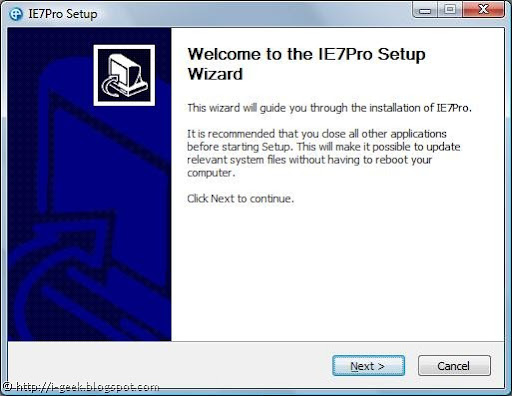
Enhance your web browsing experience with IE7Pro with plug in for Windows Internet Explorer 7

IE7 Pro SetupIE7Pro is a all-in-one plug in for Windows Internet Explorer 7. With IE7Pro installed once, you will never need to look after any tunings for better internet browsing experience than this.

Version 2.2 of IE7Pro as screencasted in here, shows many settings for IE7 with just a single click. Some of them include:

Includes a lot of IE tweaks, includes:
   * Crash recovery
   * Super Drag and Drop
   * Quick proxy switcher
   * Enhanced Tabbed Browsing
   * Mouse gestures
   * Hotkey customization
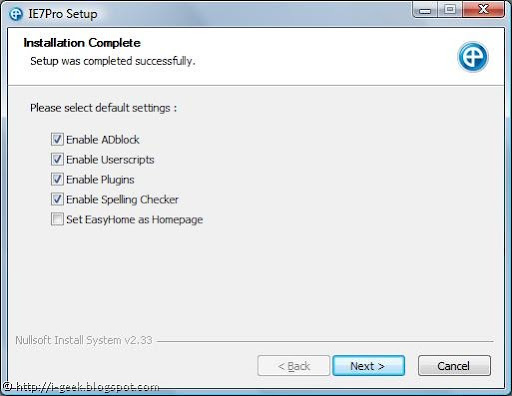
   * Address bar shortcutsIE7 Pro Setup Settings

With IE7Pro one can:

1.Manage ads, block unwanted ads with ADblock

Supports blocking all forms of advertisments, including Flash ads, rich media, fly-ins, slide-ins, pop-up, pop-under.
Filters DIVs , URLs, Images, Tables, iFrames. Visit AD Filter list.

2.Enable or disable Userscripts

The most powerful user script platform for IE

IE7 Pro's Google based search

(like the Grease Monkey extension for Firefox). Also included Easy homepage.

Visit http://www.iescripts.org for more user scripts and plugins.

3. Many plugins to be checked for

4.Enable Spelling Checker as in Firefox

Checks spelling errors while composing mails, blog entries or any text area entries using the spellchecking engine from OpenOffice. Supports up to 16 languages.

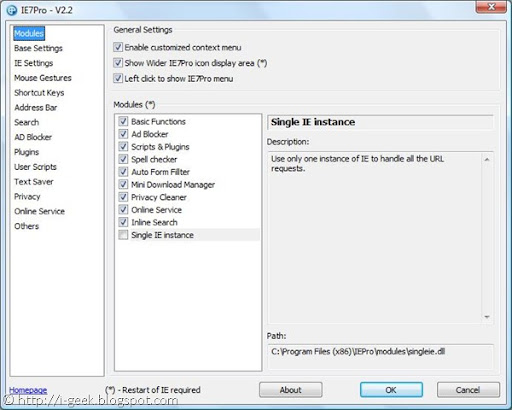
IE7 Pro v2.2 Modules

Auto Form Filler:

A simple form & password manager and form filler which completely automates password entering and form filling.

It also includes Text Saver, which lets you restore the lost text while composing mails and text area posts in case of crashes.

Mini Download Manager:

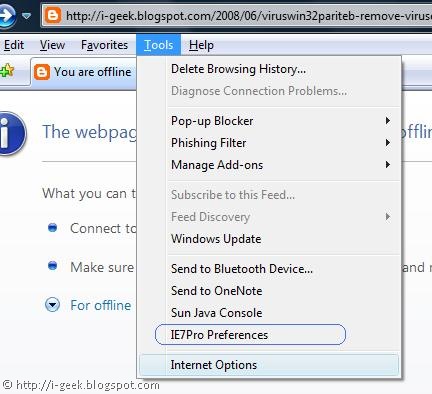
IE7 Pro preferences

The smallest download manager for IE, It supports resuming Downloads and simultaneous downloads.

Inline Search:

Search the page as you type, like the Find as you type feature of Firefox.

Single IE Instance:

Use only one instance of IE to handle all the URL requests.

Accu Weather:

Display the local weather in the statusbar, Copy from Windows vista accu weather gadgets

Alexa Rank or Google PageRank:

Display the website's Alexa and Google Page Rank.

Book Burro- Remixing the bookstore:

Compare book prices from various book stores

Download Video:

Save video clips from YouTube, Google Video, Myspace, Metacafe, Break.com, Putfile, Dailymotion and Sevenload.

Download Video from YouTube:

adds a link to download flv from YouTube

*youtube.com/*v=*

Other features include Flickr Rich Edit, GMail CSS Skin, Google Blogsearch, Google Images NoFrame link, Google Link Preview, GoogleX, Myspace custom style remover, Myspace Notifier, RSS+Atom Feed Subscribe Button, Show Password onMouseOver, YouTube Resizer, YouTube.com- dark gray redesign http://userstyles.org/

Download the latest version of IE7Pro now to fully customize your IE Experience @ http://www.ie7pro.com/

Wednesday, August 06, 2008

Bharti Airtel to Bring iPhone 3G to India on August 22

Bharti Airtel Wednesday announced that it will launch the iPhone 3G in India on August 22. iPhone 3G combines all the revolutionary features of iPhone plus 3G networking that is twice as fast, built-in GPS for expanded location-based mobile services, and iPhone 2.0 software which includes support for Microsoft Exchange ActiveSync and runs hundreds of third party applications available through the new App Store.

"iPhone has been the iconic technology revelation of this year, "said Sanjay Kapoor, president of Mobile Services at Bharti Airtel. "Airtel has been at the forefront of innovation and customer delight in the Indian telecom sector. Introducing iPhone 3G to India further underscores our commitment to enrich the communication experience of all Airtel users."

Customers will be able to purchase iPhone 3G at Airtel Relationship Centers. Details of pricing will be announced at a later date. Airtel customers who wish to receive more information on iPhone 3G can log on to http://www.airtel.in/iphone3g/

Monday, August 04, 2008

How to activate Microsoft Office Suite 2007/08?

This is a quick guide on activating or checking the activation status of Microsoft Office Suite 2007/08.

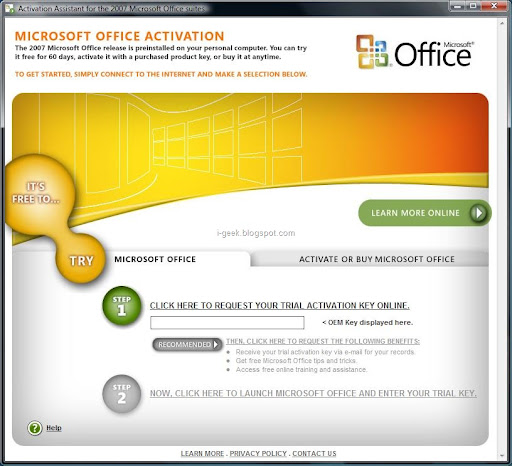
Open Activation Assistant for the 2007 Microsoft Office Suites. Simply type this phrase in Start Search feature of the start menu to get initiated. (Screenshots used in this article refer to Microsoft Office Home and Student 2007 Edition)

To continue to use all of the features of your product, you must activate the product. Microsoft Product Activation is a Microsoft anti-piracy technology designed to verify that software products are legitimately licensed.

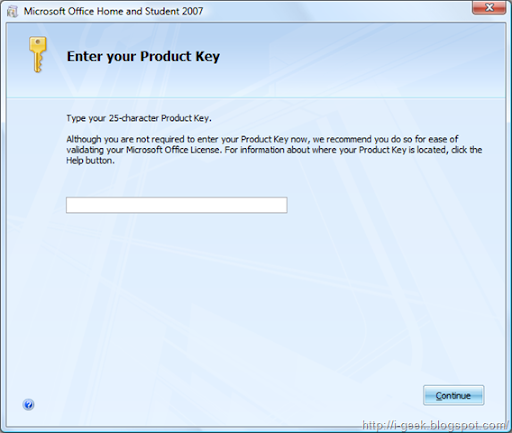
Activation works by verifying that the Product Key, which you must supply to install the product, is not in use on more personal computers than are permitted by the software license.

Microsoft Office Activation might say "The 2007 Microsoft Office release is preinstalled in your personal computer. You can try it free for 60 days, activate it with a purchased product key or buy it anytime." if you haven't already activated the Microsoft Program.

activating microsoft office 2007

Help section of the Activation Wizard or similar Wizard goes on Try Microsoft Office as

To try Microsoft Office free for 60 days, go to the Try Microsoft Office tab. Connect to the Internet and click Step 1 to request a trial activation key online. Click Step 2 to launch Microsoft Office and enter the trial activation key. Then follow the additional steps to complete the activation process. Note that Step 1 must be completed to access Step 2.

We recommend that you select the additional benefits to request an e-mail with the trial activation key for your records.

Activate or Buy Microsoft Office

To activate the software with a purchased license, go to the Activate or Buy Microsoft Office tab. Locate the product key on your purchased software or confirmation e-mail. Click activate a purchased license and enter the full product activation key. Then follow the additional steps to complete the activation process. Note that the language and suite of the purchased license should match the preinstalled software.

Microsoft Office Home and Student 2007

Related Readings:

Subscribe to geeklog feed Bookmark and Share

Design by Free blogger template