Showing posts with label Software Issues. Show all posts

Friday, June 19, 2009

Genuine Validation for Windows Vista- is copy of your Windows legal?

Genuine Validation is required for Windows Vista

A properly licensed copy of Windows Vista that has passed Microsoft Genuine validation is required to enable certain product features and to obtain non-security updates and product support from Microsoft.

Genuine Validation for Windows Vista

More about Genuine Microsoft Software can be found on Windows Genuine Advantage FAQs page.

Sunday, April 26, 2009

Kaspersky Lab announces anti-virus for Windows 7

Kaspersky Lab, makers from Kaspersky Antivirus (KAV) has announced the Kaspersky Anti-Virus for Windows 7 beta users and plans to extend the compatibility with full release of Windows 7.kaspersky-for-windows7-logo

Kaspersky Lab’s suite of security offerings will be available to Windows 7 users immediately following the launch of the new operating system. According to the lab more than 300,000 people over two and a half months have installed the version of KAV for Windows 7. They have extended thanks to collaboration with Microsoft for receiving an exceptional amount of valuable feedback from beta testers that will enable them to ensure that their products are fully compatible with Windows 7 upon final release.

More news related to Kaspersky Antivirus and Windows 7 from previous posts on this geeklog.

Saturday, April 04, 2009

Using Nero RescueAgent to recover corrupt, deleted files and older file versions

If you have been searching how to recover corrupt or deleted files from your PC, this article might be useful to you and end your search here for Nero RescueAgent.

With Nero RescueAgent you can quickly and easily recover files from storage media, that, for instance, have been corrupted by scratches or cannot be read correctly due to ageing. The following storage media are supported by Nero RescueAgent.

CD
DVD
Hard drive
USB stick
Memory card
Floppy

For multisession disks and disks formatted for the UDF file system capable of packet writing, Nero RescueAgent also provides the option of recovering deleted files and older file versions.

Working with Nero RescueAgent
The Nero RescueAgent Assistant helps you to restore files in just a few steps.
The following individual steps are necessary.

Select storage medium and scan level.
Search storage medium for files that can be restored.
Select files to be restored and define storage location for files.
Start Restore
Save log file (optional)

Then you can either start a new scan, scan the storage medium again, restore files or end Nero RescueAgent.

Nero RescueAgent is a Nero AG product. To purchase Nero RescueAgent or read details about it visit the official Nero website www.nero.com.

Wednesday, February 04, 2009

Latest tech news with Obama Virus, GEARS OF WAR GAME, Firefox,

WORM FLOATS OBAMA'S HEAD ON YOUR DESKTOP
The odds are pretty good that this will never happen to you, but should a floating head of U.S. President Barack Obama pop up on your desktop Monday morning, know this: You've been hit with the Obama worm. Though it is not detected by any antivirus products right now, it is not considered to be a serious threat because it has infected so few systems. Because antivirus programs don't detect it yet, it's also hard to know when you've been infected. For more Google the news.

GEARS OF WAR GAME RENDERED UNPLAYABLE BY FLAWED DRM
The game Gears of War suddenly 'expired' on PCs on the 28th of January this year. The DRM (Digital Rights Management) associated with the game has a flaw which renders the game unplayable post that date. Gamers are angered by this premature expiry and the forum of the game developer, Epic, is abuzz with complaints. A 'super moderator' on Epic's forum has said "We have been notified of the issue and are working with Microsoft to get it resolved. Sorry for any problems related to this. I'll post more once we have a resolution".

FIREFOX 3.1 BETA 3 DELAYED AGAIN
The release of the third beta of Mozilla's Firefox 3.1 web browser has been delayed again after 18 bugs were detected in TraceMonkey - the browser's JavaScript engine. Mozilla was unable to confirm whether the delay, the second one this month, would affect the releases of the final version of the browser.

Friday, January 30, 2009

Microsoft Adds Clickjacking Protection to IE8 RC1

Protection against malicious Web attacks and tweaks to a feature that lets users browse the Internet privately are among updates Internet Explorer users can test in the first release candidate for IE8.

Microsoft released the feature-complete version of IE8 to the Web. Microsoft added performance tweaks to existing features and one major security update to block Web attacks known as "clickjacking" that the company said makes IE8 the only Web browser to offer such protection.

Clickjacking lets hackers put a transparent filter on sites so they can view what information a user is accessing and what activities that user is doing, said James Pratt, an IE senior product manager at Microsoft. For example, if someone is on a bank Web site, attackers can use clickjacking to see the user's bank information and acquire passwords, and the user will not know the information is being viewed remotely, he said.

The security feature that thwarts clickjacking in IE8 RC1 allows Web-site content owners to put a tag in a page header that will help detect and prevent clickjacking. If a site that uses the IE8 tag detects clickjacking, it will give Web users an error screen letting them know that the content host has chosen not to allow that content, and gives them the option to open the content in a new window that is protected from the attack.

Microsoft also in RC1 expanded the functionality of a feature it introduced in the IE8 beta 2 release called InPrivate. InPrivate has two settings -- InPrivate Browsing, which lets users browse the Web without creating a record of where they've been or enabling cookies, and InPrivate Blocking, which has been renamed in RC1 to InPrivate Filtering.

InPrivate Filtering lets people set a threshold for how many times third-party content appears on sites they are browsing before the feature allows them to view information on how those third-party content owners are collecting information about browsing habits. That threshold can be set between three times and 30 times.

For example, Pratt said that if the same third-party advertisement appears 10 times on Web sites that a user is browsing in a session and the person's InPrivate Filtering threshold is set to 10, the user can then view how the third-party content owner is collecting information about browsing activities.

The Compatibility View introduced in IE8 beta 2 also got a refresh in RC1. The feature allows users to view Web sites that may not be compatible with current Web standards IE8 supports in another view so the sites render properly.

Microsoft added more support for current Web standards such as CSS (Cascading Style Sheets) and RSS in IE7, but sites that were designed for previous versions of IE that didn't support these standards didn't work properly. One of Microsoft's chief goals for IE8 is to make it as Web standards-compatible as possible, but also to ensure older sites can be viewed the way they were designed.

In IE8 RC1, Microsoft built into the browser a list of common Web sites that it discovered must be viewed in Compatibility View mode to render properly, Pratt said. Now when someone browses these sites in IE8 RC1, they automatically appear in that mode without a user having to click on a "Compatibility View" button, as they had to in IE8 beta 2, he said.

Microsoft also tweaked browser performance features so IE8 RC1 opens faster as an application and also opens new tabs or Web pages faster, the company said.

Wednesday, January 14, 2009

Article Symantec Launches Public Beta of Norton 360 3.0

Symantec has announced the availability of the public beta of Norton 360 version 3.0.  Norton 360 was first launched in early 2007, and is Symantec's 'set it and forget it' security suite for users who don't want to have to think about internet security.

The public beta of Norton 360 v3.0 includes Norton Safe Web, the security giant's website-rating service (similar to McAfee SiteAdvisor). Right now, according to Symantec, Norton Safe Web has more than 100,000 registered beta testers and provides site rating information for more than 13 million search results each day. Symantec says the version 3.0 release of Norton 360 also sees enhancements to tuneup and backup, and the security and performance improvements launched last year with Norton Internet Security 2009.

"Our goal for this version of Norton 360 is to deliver comprehensive protection with zero impact on performance, so consumers can be productive online, backup their valuable data, and keep their computer running at peak performance," said Symantec's Rowan Trollope. "With Norton Safe Web, we are extending that protection to make shopping and other everyday online activities safer," he added.

The Norton 360 version 3.0 beta including Norton Safe Web is available for free public download . For Norton Internet Security 2009 users, a browser plug-in version of the Norton Safe Web beta is available for download . Internet users can access the Norton Safe Web free online community site at safeweb.norton.com.

Monday, January 05, 2009

Getting UltraISO work much for you- creating bootable dvds or creating virtual drives or more

Most of us are enchanted by some few disk which contain more file size than the capacity of the disk. One will be able able to burn 800+MB(rough guess) to a single CD of 700MB size using ZB Systems UltraISO software. One can create a New ISO Image, Edit ISO Image content, Create ISO Image from CD/DVD Disc, Convert CD/DVD Image format (.iso, isz, .bin, .cue, .mdf, .mds, .nrg, .img, .ccd, .sub), Make Bootable CD/DVD, Make multi-boot CDs and DVDs and many more features of UltraISO to be explored by you.

The size limitation of the ISO Image that UltraISO can process is 2TB(2000GB)- it's yet a monster space. Runs on 32bit or 64bit Windows Vista/2003/XP, Windows 2000, ME, 98SE, 98, Windows NT4.0 SP6a+ operating system . To purchase a licensed copy of UltraISO Please visit their website to get more details: http://www.ezbsystems.com.

Along with large capacity hard disk popularity,  people were already used to coping compact discs to CD/DVD image files (also called compact disc image document) , generally used  is the famous ISO 9660 international standards format, therefore CD/DVD image files are called ISO files. Because the ISO file retained complete data information of the compact disc (including compact disc boot information), you were allowed the convince to use commonly used CD burning software (for example Nero-Burning ROM ) to record the disc with your CD-R/RW over and over forever, it can also be used directly through Virtual CD-ROM drive software (for example SoftDisc ) .

ultraiso-tools UltraISO  is a CD/DVD image file creating/editing/converting tool , it can directly edit the CD/DVD image file and extract files and folders from it, as well as directly make ISO files from your CD/DVD drive or  hard disk. At the same time, you can maintain the ISO bootable information, thus creating your own bootable CDs and DVDs. You now have the power to make and  edit your own ISO files, and then burn them to CD or DVD for your own needs.

UltraISO is in sole possession of the intellectualized ISO document format analyzer, it can process at the present time almost all types of image files, including  ISO and BIN, it may even support new image files which are yet to be created. UltraISO can open these image files, directly extract files and folders, edit it and convert other image files to the standard ISO format.

UltraISO uses the double window unification user contact interface, you have the choice to only use the quick buttons and/or the mouse Drag & Drops, you can handle any CD/DVD image file easily.

The UltraISO main characteristic includes :

  • Can directly edit the ISO image file.

  • Can directly extract files and folder from ISO image file

  • Can add / delete /create new directory /rename ISO file image content.

  • Can make ISO file from hard disk document.

  • Can create CD image from CD/DVD-ROM, maintain bootable information.

  • Can process the compact disc boot information, you can directly add/remove/extract boot image of the ISO image.

  • Supports nearly all known CD image file formats (.ISO, .BIN, .IMG, .CIF, .NRG, .BWI and so on) , and converts them to the standard ISO form image.

  • May directly set the file/folder to hidden attribute

  • Supports ISO 9660 Level1/2/3 and Joliet extension

  • Automatically optimizes the ISO image file structure, saves the CD space.

  • Supports the shell document type integration, Open Image files through double clicking them or the Right Click menu of the mouse with the open dialog.

  • The double window user interface is extremely convenient to use.

  • There are rich add-on tools, you can create ALL in 1 bootable compact discs, CD image file management, even the virtual CD/DVD drive, those functions are really powerful.

Saturday, January 03, 2009

Convert video to any format using Xilisoft PSP Video Converter

Click to enlarge the image : Convert video to any format using Xilisoft PSP Video Converter Xilisoft PSP Video Converter is a powerful video and audio conversion program. It supports converting most video formats including DVD, VCD, AVI, WMV, MP4, MOV, 3GP, animated GIF, RM, ASF to MP4 and MP3 which can be played in your Sony PSP.

Features


  • Convert various video file formats to MP4
  • Convert most audio file formats to MP3
  • Extract audio from video file and save to MP3
  • Encode several files simultaneously
  • Pause encoding process to run other CPU time consuming programs at any time

    Specification


    Supported file format

    • Video:
      MPEG(mpg, mpeg, dat, vob); WMV; ASF; AVI; QuichTime(mov, qt); MPEG4(mp4); 3GP; DV(dv, dif); Real Video(rm); Animated GIF(gif - decoding only); Macromedia Flash(swf - decoding audio only);
    • Audio:
      MPEG Audio(mp2, mp3); WMA; WAV; AU; MPEG4 Audio(m4a); Real Audio(ra); OGG; AAC; Raw AC3(ac3); NUT Open Container Format(nut);
  • Supported video and audio codecs

    • Video codecs:
      MPEG1 video; MPEG2 video; MPEG4(DivX4/DivX5/XVID); MSMPEG4 V1; MSMPEG4 V2; MSMPEG4 V3(DivX3); WMV7; WMV8; H263(+)(Real Video 1.0); MJPEG; Lossless MJPEG; Apple MJPEG-B; Sunplus MJPEG; DV; Huff YUV; Asus v1; Asus v2; Creative YUV; H.264; Sorenson Video 1; Sorenson Video 3; On2 VP3; Theora; Intel Indeo 3; FLV; ATI VCR1; ATI VCR2; Cirrus Logic AccuPak; 4X Video; Sony Playstation MDEC; Id RoQ; Xan/WC3; Interplay Video; Apple Animation; Apple Graphics; Apple Video; Cinepak; Microsoft RLE; Microsoft Video-1; Westwood VQA; Id Cinematic Video; Planar RGB; FLIC video; Duck TrueMotion v1; VMD Video; MSZH; ZLIB; TechSmith Camtasia; IBM Ultimotion;
    • Audio codecs:
      MPEG audio layer 2; MPEG audio layer 1/3; AC3; Vorbis; WMA V1/V2; AAC; Microsoft ADPCM; MS IMA ADPCM; QT IMA ADPCM; 4X IMA ADPCM; G.726 ADPCM; Duck DK3 IMA ADPCM; Duck DK4 IMA ADPCM; Westwood Studios IMA ADPCM; SMJPEG IMA ADPCM; CD-ROM XA ADPCM; CRI ADX ADPCM; Electronic Arts ADPCM; RA144; RA288; RADnet; AMR-NB; AMR-WB; DV audio; Id RoQ DPCM; Interplay MVE DPCM; Xan DPCM; Apple MACE 3; Apple MACE 6; FLAC;

    System requirements


  • Windows 98/Me or Windows 2000/XP or better
  • >750MHz Intel or AMD CPU

    For full information about ImTOO PSP Video Converter, please visit http://www.xilisoft.com/psp-video-converter.html

  • Sunday, December 21, 2008

    How to remove XP Antivirus 2008, XP Antivirus 2009, and XPAntiVirus (A Complete Removal Instructions)

    Everywhere where ever I go, whoever calls for maintaining their system clean, whoever have been browsing a lot and with somehow near to thug periphery of XP Antivirus. Hope this collective article, might help for a lot of people like you to remove Malwares and Spywares like this.

    What XP Antivirus does:

    This is a slight background info, skip to complete removal steps of XP Antivirus 2008.

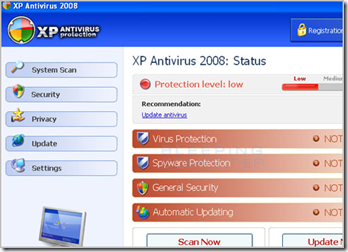
    imageXP Antivirus 2008, XP Antivirus 2009, and XPAntiVirus are scoundrel (oops! can there be a better word then this) antivirus programs, when run, display false results as a tactic to scare you into purchasing the software. Older versions of XP Antivirus would create 9 entries in your Windows Registry that impersonate infections on your machine, according to BleepingComputer.com. In reality, though, these registry entries were harmless and had absolutely no effect on your computer. Instead, these entries were set so that XP AntiVirus can find them when scanning your computer and report them as infections. The newer of versions of the program , such as XP Antivirus 2008 and XP Antivirus 2009, instead just display false results when scanning your computer that state infections were found. In order to remove these fake infections, though, you would first need to purchase the software as the trial does not allow you to remove them.

    While running, XP Antivirus will also display fake alerts stating that you are infected or under attack from some type of threats. These alerts are fake and can be ignored. If you do click on the alert, though, it will prompt you to purchase the software. Examples of text contained in these alerts can be found below.

    Privacy Violation alert!
    XP antivirus detected Privacy Violation. Some program is secretly sending your private data to untrusted internet host. Click here to block this activity by removing threats (Recommended).

    or

    System files modification alert!
    Some critical system files of your computer were modified by malicious program. It may cause system instability and data loss. Click here to block unathorised <sic> modification by removing threats (Recommended).

    Removing XP Antivirus 2008:

    @ Don't purchase this fraudware ar any cost, there is no harm actually to your system so if you can, remove all traces of this Malware if know by any way such as Process Explorer or Tune Up Utilities Process Manager or Vista Manager's Process Manager or use any software that's soft for you. THIS IS THE MOST IMPORTANT WAY TO REMOVE XP ANTIVIRUS 2008. Find complete list of related processes of this malware, below.

    @   For Add/Remove Programs control panel entry click here XP antivirus 1.0.1

    References:


    Don't forget to read the discussion on Getting rid of Kinza virus : How do I remove kinza virus?

  • The official link to Kaspersky Antivirus - kaspersky.com

  • Choose an apt security software for you, read Reinvesting in Security? THINK ONCE AGAIN!

  • Search for more virus related articles and registry in this i-geek blog

  • The easiest way to remove viruses/malwares without installing any antivirus software

  • Tuesday, December 16, 2008

    Convert your video to any other formats using Video Convert Premier

    video convert premier Video Convert Premier realize DVD CD/SVCD burning, and conversion in different video files. It can convert and split : : AVI, MPEG, MPEG 1, MPEG 2, MPEG 4, VCD, DVD, SVCD, RMVB, RM, WMV, MOV, DIVX, ASF, VOB, AAC, AC3, MP2, MP3, AMR, WAV and etc. and version 6 can recognize more format! It is a home video software to satisfy all you requirements of storing in PC or watching at home TV. It is easy-in-use, only in 4 steps to convert, split or merge movies.

    We designed more Humanization and Rationalization in each interface to let you know what kind of format you are setting, and this also helps you to change the favorable parameters easily to receive the best quality.

    Convert your video to most of other formats seamlessly. You can get these versions with the rapid fast conversion- AVI, 3GP, MPEG, MPG, MOV, WMV, RM, SWF and so on. Video Convert Premier has the simple and the best graphics on such a cool video converter.

    video convert premier


    Smile

    Save time

    a. It is outstanding both in high-speed and vivid-vision;

    b. The easy-in-use interface reduces your time in learning;

    c. According to surveys, it saves 35% time in video conversion;

    SmileSave money

    a. It is one-way ticket you have to buy in video converting and creating;

    b. Guarantee 30-days-money-back if you are unsatisfied with it!

    SmileAll in one tool

    Whether you convert files, or store video with a different formats,
    all are realized in it. No adv watermark exist after registration.

    SmileEasy-in-use

    With step-by-step manual, enjoyable interface and one-click process,
    you will experience your enjoyment in multimedia with Video Convert Premier. 


    You can purchase Video Convert Premier securely through the web, with the help of our e-commerce resellers ShareIt. It is fast, simple and secure!

    http://www.Color7tech.com

    Sunday, September 28, 2008

    How to re-enable the Snipping Tool

    After making a few tweaks here and there to your computer, you may find that the Windows Snipping Tool had disappeared. I use it quite often for this weblog so when it disappeared, I had quite a headache. I’m sure many also want to know how to bring this tool back.

    First, open your Start Menu and type in programs and features.
    Then choose “Turn Windows Features on or Off” from the side Menu.

    You probably least expected this, but snipping tool falls under the Tablet PC Optional Components category.
    Snipping Tool Windows Vista

    Check it again, press OK, and your Snipping Tool will come back.

    http://www.vistarewired.com/2008/03/08/how-to-re-enable-the-snipping-tool

    Subscribe to geeklog feed Bookmark and Share

    Design by Free blogger template