Showing posts with label Browsers. Show all posts

Wednesday, February 04, 2009

Latest tech news with Obama Virus, GEARS OF WAR GAME, Firefox,

WORM FLOATS OBAMA'S HEAD ON YOUR DESKTOP
The odds are pretty good that this will never happen to you, but should a floating head of U.S. President Barack Obama pop up on your desktop Monday morning, know this: You've been hit with the Obama worm. Though it is not detected by any antivirus products right now, it is not considered to be a serious threat because it has infected so few systems. Because antivirus programs don't detect it yet, it's also hard to know when you've been infected. For more Google the news.

GEARS OF WAR GAME RENDERED UNPLAYABLE BY FLAWED DRM
The game Gears of War suddenly 'expired' on PCs on the 28th of January this year. The DRM (Digital Rights Management) associated with the game has a flaw which renders the game unplayable post that date. Gamers are angered by this premature expiry and the forum of the game developer, Epic, is abuzz with complaints. A 'super moderator' on Epic's forum has said "We have been notified of the issue and are working with Microsoft to get it resolved. Sorry for any problems related to this. I'll post more once we have a resolution".

FIREFOX 3.1 BETA 3 DELAYED AGAIN
The release of the third beta of Mozilla's Firefox 3.1 web browser has been delayed again after 18 bugs were detected in TraceMonkey - the browser's JavaScript engine. Mozilla was unable to confirm whether the delay, the second one this month, would affect the releases of the final version of the browser.

Saturday, January 03, 2009

Google Suggests Gmail Users Dump IE

Google Inc. is pushing users of its Gmail  e-mail service to dump Microsoft Corp.'s Internet Explorer for its own Chrome browser or Mozilla Corp.'s Firefox.

When users of IE6 reach Gmail.com, a "Get faster Gmail" message appears in the Web-based service's menu bar. The message, in turn, links to a page on Google's Web site that touts Chrome and Firefox 3 as being "twice as fast" at running Gmail.

Last week, the Gmail site also displayed the message to users browsing with Microsoft's IE7, but Google has since discarded that version of the notice. Users running other browsers, including Apple Inc.'s Safari and Opera Software ASA's namesake browser, haven't been shown the speed-up message.

Google currently lists IE7, Firefox 2.0 and later releases, Chrome and Safari as the only supported browsers for Gmail . Others, including Opera and older editions of IE, Firefox and Safari, can be used to access the e-mail service but aren't able to handle some of its features.

Google has been aggressively marketing Chrome since it stripped the browser of its beta label earlier this month. A day later, for example, Google dropped Firefox as the default browser bundled with Google Pack application bundle and added Chrome in its place.

Google, Mozilla and WebKit -- the open-source project that provides the engine for Apple's Safari -- have spent much of the second half of this year trumpeting JavaScript performance improvements , a necessary move, they say, to make Gmail and other Web applications run at speeds similar to that of traditional desktop software.

Friday, September 05, 2008

Google Browser 'Chrome' Takes on Microsoft and Mozilla

Google is launching a beta version of its own Web browser today in more than 100 countries, the company announced yesterday in a blog posting.
The open-source browser, called Chrome, first appeared on an unofficial Google blog in the form of a comic book. "As you may have read in the blogosphere, we hit 'send' a bit early on a comic book introducing our new open source browser, Google Chrome," the company said in the official announcement that appeared late Monday afternoon after the Internet began buzzing about the comic-book site. The blog posting was by Sundar Pichai, vice president of product management, and Linus Upson, engineering director.

The browser window is "streamlined and simple," they said, describing in words what can be seen visually at the unofficial blog, Google Blogoscoped. "To most people, it isn't the browser that matters. It's only a tool to run the important stuff —the pages, sites and applications that make up the Web. Like the classic Google homepage, Google Chrome is clean and fast. It gets out of your way and gets you where you want to go," the blog posting said.

Chrome will run Web applications "much better," they wrote, with tabs kept in an isolated "sandbox," which will prevent "one tab from crashing into another and provide improved protection from rogue sites." Better speed and responsiveness are also part of Chrome, which features "a more powerful JavaScript engine, V8, to power the next generation of Web applications that aren't even possible in today's browsers."
Components from Apple's WebKit and Mozilla's Firefox are part of the open-source Chrome, they said.

Mozilla to Get Google Cash for Three More Years

Mozilla has renewed an agreement with Google that pays the browser maker for assigning Google's search engine as Firefox's default.
"This agreement now ends in November of 2011 rather than November of 2008, so we have stability in income," said Mitchell Baker, currently the chairwoman of Mozilla.

Mozilla generates the bulk of its income from ties to Google, according to the company's latest financial results. For the 2006 tax year - the most recent numbers make public by Mozilla - 85 percent, or about $57m of the company's $67m in annual revenues for the year, came from Google.
Firefox assigns the Google search site as the default for the browser's search bar; users can, however, change that to a rival search site if they wish. The browser also defaults to a Google URL for its home page.
Mozilla and Google last inked a two-year deal in 2006 that was to expire in November.


Saturday, August 30, 2008

Security the New Keyword for IE 8 in Beta Version 2

Microsoft's updated browser, Internet Explorer 8, promises an assortment of new features, with the goals of making Web browsing with IE safer, easier, and more compatible with Net standards. We looked at Beta 2. On the surface, IE 8 seems to be a lot like IE 7, but Microsoft has made a good number of changes. However, you may have seen some of the new features in its no-longer-upstart competitor, Mozilla Firefox 3.

If you accidentally close a browser window in IE 8, you can opt to restore it when you reopen the program (just as you can in Firefox). But IE 8 will group related tabs together using color coding. If you open a link from pcworld.com in a new tab, for example, it will open adjacent to the original tab, and the tabs themselves will have a matching color. You can move tabs from one group to another, but if you have three unrelated pages open, you cannot create a group out of them.

Perhaps the most novel addition in IE 8 is what Microsoft refers to as tab isolation. The feature is designed to prevent a buggy Web site from causing the entire program to crash. Instead, only the tab displaying the problematic page will close, allowing you to continue browsing.

Of course, IE 8 Beta 2 retains some of the features introduced in the first beta, including WebSlices and accelerators.

If you enable IE 8's InPrivate feature, the browser will not save any sensitive data--passwords, log-in info, history, and so forth. It would be as if your browsing session had never happened. This feature is very similar to Private Browsing in Apple's Safari browser, except that an icon in IE's address bar makes InPrivate's active status more obvious.
The browser's phishing filter—called SmartScreen— improves upon its predecessor's filter with such features as more thorough scrutiny of a Web page's address (to protect you from sites named something like paypal.iamascammer.com and a full-window warning when you stumble upon a suspected phishing site. SmartScreen relies largely on a database of known phishing sites, so a new, unknown phishing site may be able to slip through the cracks.

IE 8 displays sites' domains in a darker text color, so you can more easily see whether you're actually visiting an ebay.com page, say, or in reality a page on some site you've never heard of. Microsoft could still put a little more emphasis on the domain name (using a different color background, for example), but the highlighting is a welcome addition.

Creating a site that looks identical in Internet Explorer, Firefox, and Safari can be a challenge. IE 8 Beta 2 offers better support for W3 Web standards —a set of guidelines developed to ensure that a Web page appears the same in all browsers. The downside is that IE 8 will break some pages designed for earlier Internet Explorer versions.
To counteract this, Microsoft has added a compatibility mode: Click a button in the toolbar, and IE 8 will display a page the same way that IE 7 does. In my testing, I found that most pages worked fine with the standard (new) mode, and that most errors were minor cosmetic ones. Unfortunately, the Compatibility Mode toggle button may not be obvious to most users, because it's pretty small; a text label would have helped.
While it likely won't convince many Firefox users to jump ship, Internet Explorer 8 Beta 2 may be worth considering for people who have not yet solidified their browser loyalties.

from: http://www.pcworld.in/india/news/Internet/Security_the_New_Keyword_for_IE_8_in_Beta_Version_2/5636170/9

Wednesday, August 27, 2008

Enhance your web browsing experience with IE7Pro with plug in for Windows Internet Explorer 7

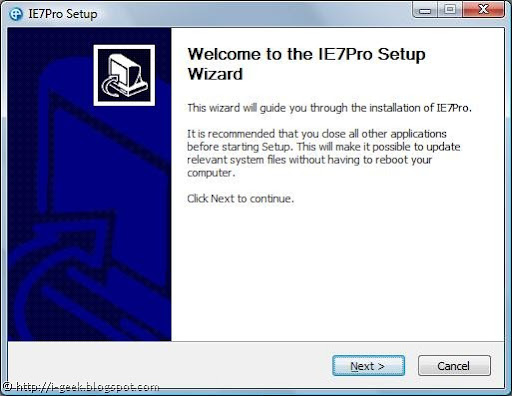
IE7 Pro SetupIE7Pro is a all-in-one plug in for Windows Internet Explorer 7. With IE7Pro installed once, you will never need to look after any tunings for better internet browsing experience than this.

Version 2.2 of IE7Pro as screencasted in here, shows many settings for IE7 with just a single click. Some of them include:

Includes a lot of IE tweaks, includes:
   * Crash recovery
   * Super Drag and Drop
   * Quick proxy switcher
   * Enhanced Tabbed Browsing
   * Mouse gestures
   * Hotkey customization
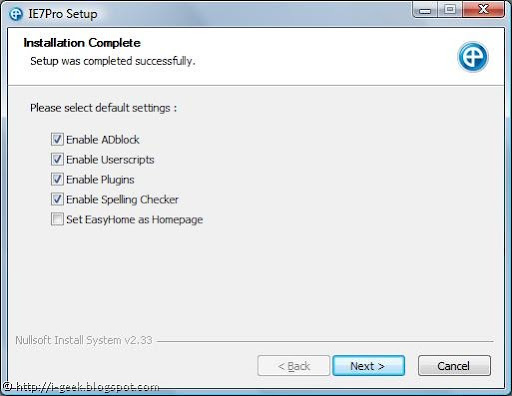
   * Address bar shortcutsIE7 Pro Setup Settings

With IE7Pro one can:

1.Manage ads, block unwanted ads with ADblock

Supports blocking all forms of advertisments, including Flash ads, rich media, fly-ins, slide-ins, pop-up, pop-under.
Filters DIVs , URLs, Images, Tables, iFrames. Visit AD Filter list.

2.Enable or disable Userscripts

The most powerful user script platform for IE

IE7 Pro's Google based search

(like the Grease Monkey extension for Firefox). Also included Easy homepage.

Visit http://www.iescripts.org for more user scripts and plugins.

3. Many plugins to be checked for

4.Enable Spelling Checker as in Firefox

Checks spelling errors while composing mails, blog entries or any text area entries using the spellchecking engine from OpenOffice. Supports up to 16 languages.

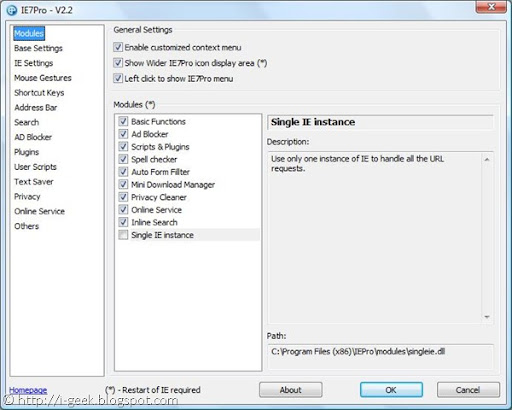
IE7 Pro v2.2 Modules

Auto Form Filler:

A simple form & password manager and form filler which completely automates password entering and form filling.

It also includes Text Saver, which lets you restore the lost text while composing mails and text area posts in case of crashes.

Mini Download Manager:

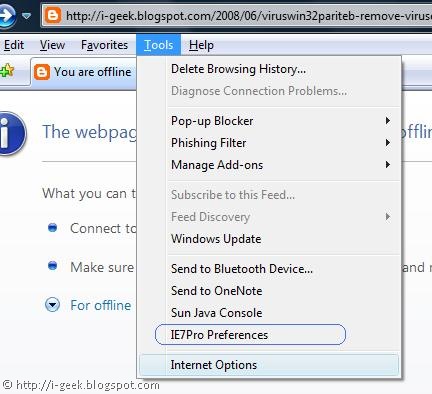
IE7 Pro preferences

The smallest download manager for IE, It supports resuming Downloads and simultaneous downloads.

Inline Search:

Search the page as you type, like the Find as you type feature of Firefox.

Single IE Instance:

Use only one instance of IE to handle all the URL requests.

Accu Weather:

Display the local weather in the statusbar, Copy from Windows vista accu weather gadgets

Alexa Rank or Google PageRank:

Display the website's Alexa and Google Page Rank.

Book Burro- Remixing the bookstore:

Compare book prices from various book stores

Download Video:

Save video clips from YouTube, Google Video, Myspace, Metacafe, Break.com, Putfile, Dailymotion and Sevenload.

Download Video from YouTube:

adds a link to download flv from YouTube

*youtube.com/*v=*

Other features include Flickr Rich Edit, GMail CSS Skin, Google Blogsearch, Google Images NoFrame link, Google Link Preview, GoogleX, Myspace custom style remover, Myspace Notifier, RSS+Atom Feed Subscribe Button, Show Password onMouseOver, YouTube Resizer, YouTube.com- dark gray redesign http://userstyles.org/

Download the latest version of IE7Pro now to fully customize your IE Experience @ http://www.ie7pro.com/

Saturday, August 09, 2008

New Firefox to Boost Open-source Video Software

Mozilla is edging closer to releasing a new version of Firefox that could increase the use of open-source video software.

Firefox 3.1, the next major release due by early next year, will likely include support for a new HTML tag specifically for embedding video in web pages. Firefox 3.1 will also support royalty-free video codec Ogg Theora.

Firefox developers at a summit last week in Whistler, British Columbia, said they had started working on native Theora support, and test builds of the browser incorporating the new feature are available.

The code committed so far is a work in progress, wrote Chris Double, a Mozilla engineer who has been handling the project, "but it's a start towards using a common codec across all platforms and will improve as we get towards the 3.1 release".

When the upgrade is finalised, Firefox users won't have to download a plug-in to play Theora content. Another cited advantage is that web developers can just use a tag to mark content, rather than needing JavaScript to launch a video.

Video on the web these days is a jumble of different software formats and products, with major ones including Apple's QuickTime, Microsoft's Windows Media, Adobe's Flash and RealNetworks' RealPlayer multimedia players. The plug-ins are free. The companies make money by selling streaming servers and encoding software.

Some see that commercial interest as potentially harmful to the internet, since content locked up in a particular format could become inaccessible due to a change in a vendor's product development plans.

Videos in formats such as .AVI can be converted to Theora using VLC, an open-source streaming media server, video player and converter from the VideoLAN Project. Another open-source converter is ffmpeg2theora.

Firefox's work will streamline the delivery of video to users, wrote a user by the name of J5 on his blog. "That to me is freedom - to allow for those who prefer open formats the ability to deliver their content without any barriers between them and theirend users," J5 wrote.

Opera Software, which makes a browser by the same name, has also implemented the video HTML tag. The company said last month that it has released versions of its latest browser that support Ogg Theora for Windows, Linux and Mac OS X operating systems.

"It's such an obvious improvement over the previous state of affairs of dealing with online video that it really makes you wonder why it took so long," wrote Ben McIlwain, an IT consultant, on his blog. "We're several years into the online video revolution now (led by such giants as YouTube), so it's only fair that we finally get native browser support for videos."

The moves by Mozilla and Opera can be seen as a strike against Microsoft, which dominates the browser market. Figures from Net Applications from last month show Internet Explorer with a 73 per cent market share, compared to Firefox at 19 per cent and Opera at 0.69 per cent.

Ogg Theora isn't supported in Internet Explorer 7. It is an older compression specification compared to Adobe's Flash 9, which uses the latest H.264 technology and is used on prominent websites such as Google's YouTube.

News from http://www.pcworld.in/india/news/Software/New_Firefox_to_Boost_Open-source_Video_Software/5341197/9

Subscribe to geeklog feed Bookmark and Share

Design by Free blogger template