Showing posts sorted by relevance for query windows 7. Sort by date Show all posts

Friday, February 13, 2009

Compare Windows 7 Versions - which edition of Windows 7 is the best?

Vista's SKUs can be reflected well in all these six editions of Windows 7 to be release towards the end of this year or the beginning of the next. Compare Windows 7 Versions - which edition of Windows 7 is the best?

  1. Windows 7 Starter
  2. Windows 7 Home Basic
  3. Windows 7 Enterprise
  4. Windows 7 Ultimate
  5. Windows 7 Home Premium
  6. Windows 7 Professional

Microsoft is recommending either Windows 7 Home Premium or Professional for most of its customers. 

Windows 7 Home Premium is for the average user and Windows 7 Professional -- replacing Windows Vista Business -- is for small businesses and people who work at home but have to operate in an IT-managed or business environment with security and productivity concerns, according to Microsoft.

Windows 7 Starter is a limited-functionality version of the OS that will be available worldwide but only as a pre-install by OEMs (original equipment manufacturers). This expansion of its availability -- Vista Starter was only available in emerging markets -- led one blogger to surmise that Windows 7 Starter is the version Microsoft will push for the netbook market. Netbook makers will likely choose this version.

Windows 7 Enterprise is Microsoft's SKU for its enterprise customers, while PC enthusiasts that "want it all," according to Microsoft, should purchase Windows 7 Ultimate.

Like Vista, Windows 7 also will have Home Basic edition that will only be sold in emerging PC markets "for customers looking for an entry-point Windows experience on a full-size value PC," according to Microsoft.

Making all editions of Windows 7 available on small form-factor PCs, widely known as netbooks, is an especially strategic move for Microsoft, as the same was not true for Vista.

For more news updates on Microsoft Windows 7, visit out Label: Windows 7 CLICK HERE.

Details about the new Microsoft OS Windows 7 from their official website: http://www.microsoft.com/windows/windows-7/

Thursday, February 05, 2009

All editions of Windows 7 to run on Netbooks says Microsoft

Windows 7 logo Microsoft has recently made an announcement that it would be releasing six editions of the much anticipated Windows 7 and all of them will run on range of hardware, including Netbooks - laptops for effective Internet. The upcoming Operating System (OS) from Microsoft giant will emphasis on Windows 7 Home Premium and Windows 7 Professional, these two OS versions are supposed to be purchased by most customer.

Vista's SKUs can be reflected well in all these six editions of Windows 7 to be release towards the end of this year or the beginning of the next.

  1. Windows 7 Starter
  2. Windows 7 Home Basic
  3. Windows 7 Enterprise
  4. Windows 7 Ultimate
  5. Windows 7 Home Premium
  6. Windows 7 Professional

With Windows 7, Microsoft hopes it will be easier for customers to decide which edition of the OS is right for them. By doing so, the company once again seems to be trying to learn from mistakes it made with the release of Windows Vista, premium versions of which had special hardware requirements that hindered customers' transition from XP and confused users as to which edition they should purchase.

When Microsoft released Vista, premium versions such as Windows Vista Ultimate and Windows Vista Home Premium did not run on many PCs that already were running Windows XP. Microsoft tried to give hardware partners and customers fair warning of this and through a controversial program had OEMs put stickers on new PCs to let customers know which version of Vista those machines could run.

Still, many customers did not feel Vista hardware requirements were communicated effectively and Microsoft is still embroiled in a class-action suit over that sticker program, called "Windows Vista Capable."

For more news updates on Microsoft Windows 7, visit out Label: Windows 7 CLICK HERE.

Details about the new Microsoft OS Windows 7 from their official website: http://www.microsoft.com/windows/windows-7/

Saturday, January 03, 2009

Windows 7 January launch at CES

Details about the new Microsoft OS Windows 7 from their official website: http://www.microsoft.com/windows/windows-7/ 

windows7-logo Software could overshadow gadgets at the upcoming Consumer Electronics Show (CES), with Microsoft expected to shed light on its upcoming Windows 7 OS.

The financial meltdown may also be lingering topic as tech vendors gather to flaunt products at the show in Las Vegas, hoping to show enough glitter and sparkle to bring them better fortunes in the new year. Attendees will pour over the latest technologies, including OLED (organic light-emitting diode) TVs, netbooks, smartphones, media players, and other entertainment devices.

Audiences may miss the show's perennial star, Microsoft Chairman Bill Gates, who gave his final CES speech earlier this year. Instead, Microsoft CEO Steve Ballmer will kick off the event with a keynote address on January 7. He's expected to give a peek at Microsoft's Windows 7 OS, which many hope will be zippier and less resource hungry than Windows Vista.

Microsoft expects to make "significant" Windows 7 announcements, including a possible release of Windows 7 beta software. A "sneak peek" at future Microsoft Office software may also be offered.

A look at Microsoft's future software could add pep to what otherwise might turn out to be a subdued show. Attendance at CES 2009 is expected to drop as consumers and technology vendors cut spending amid the economic crisis. Hotels, which in previous years were often packed months before the show, have been offering discounted rates to fill rooms.

WINDOWS 7 BETA LEAKS TO INTERNET
Pirated copies of a Windows 7 build pegged by many as the beta Microsoft Corp. will release next month have leaked to the Internet, according to searches at several BitTorrent sites today. A search on the Pirate Bay BitTorrent site, for example, returned two Windows 7 Build 7000 listings, both of which had been posted Friday. As of Saturday afternoon, one torrent on Pirate Bay showed more than 1,800 "seeders"

WINDOWS 7 PIRATED AND AVAILABLE NOW
Pirated copies of a Windows 7 build pegged by many as the beta Microsoft will release next month have leaked to the Internet, according to searches at several BitTorrent sites. A search on the Pirate Bay BitTorrent site, for example, returned two Windows 7 Build 7000 listings, both of which had been posted last Friday. The Pirate Bay and other BitTorrent sites, including Mininova, listed the beta build as a 2.44GB download.

Friday, July 24, 2009

Windows 7 available to Business Users this September 7

Yet another good news about Win7. Microsoft has recently revealed that business customers can start ordering Windows 7 beginning September 7, slightly ahead of the general release of the OS on October 22.

Microsoft and its partners will take orders for Windows 7 from volume-licensing customers on that date, Microsoft Senior Vice President of Windows Bill Veghte revealed in a keynote Monday at the Microsoft Worldwide Partner Conference in New Orleans.

Microsoft also will offer a limited-time discount on the software to volume-licensing customers in the range of 15 percent to 35 percent, depending on the size of the order, he said.

Windows 7 was one of several products highlighted at Microsoft's annual partner meeting. In his keynote, Veghte stressed for partners the opportunity to provide services based on the OS, which will be available worldwide to both businesses and consumers on October 22, and will be released to manufacturing later this month.

Citing numbers from various research firms, including IDC, Veghte said that there are expected to be 77 million Windows 7 shipments by the end of 2010, and 59 percent of enterprises are expected to use Windows 7 in three years.

Microsoft will not be able to provide services and support for all of these customers, which is where partners come in. "We do not have the services capability to support that," he said.

However, another research firm believes that Windows 7 adoption may not be as widespread as some analysts and Microsoft think, despite the fact that many businesses skipped over Windows Vista and are still using the nearly eight-year-old OS, Windows XP.

A new survey conducted by ScriptLogic, the results of which were revealed Monday, found that nearly 60 percent of businesses don't currently plan to adopt Windows 7. The results were based on feedback from 1,000 IT administrators. ScriptLogic provides network administration software for Windows-based networks.

This article is adapted from PCWorld.in.

Sunday, April 26, 2009

Kaspersky Lab announces anti-virus for Windows 7

Kaspersky Lab, makers from Kaspersky Antivirus (KAV) has announced the Kaspersky Anti-Virus for Windows 7 beta users and plans to extend the compatibility with full release of Windows 7.kaspersky-for-windows7-logo

Kaspersky Lab’s suite of security offerings will be available to Windows 7 users immediately following the launch of the new operating system. According to the lab more than 300,000 people over two and a half months have installed the version of KAV for Windows 7. They have extended thanks to collaboration with Microsoft for receiving an exceptional amount of valuable feedback from beta testers that will enable them to ensure that their products are fully compatible with Windows 7 upon final release.

More news related to Kaspersky Antivirus and Windows 7 from previous posts on this geeklog.

Tuesday, April 28, 2009

Time for Windows 7, Developers geeting Windows 7 RC next week (May ‘09)

Some Microsoft developers will be able to download a near-final version of the company's Windows 7 operating system, probably first week of May 09. 

Starting on April 30, MSDN and TechNet subscribers will be able to download the Windows 7 Release Candidate, Microsoft said in a blog post. Release candidates are typically feature-complete and stable, and suggest that the final version of a product will be available very soon.

The company recently posted information accidentally on its Partner Program Web site saying that the Release Candidate was already available to developers and would be released to the general public on May 5. That page was quickly pulled because the software was not yet ready. 

In its blog post Friday, Microsoft has now confirmed that the general public will be able to download the release candidate on May 5. 

Analysts have been predicting lately that the final release of Windows 7 will appear sooner than expected. Officially, Microsoft says that it is on track to deliver Windows 7 three years after the release of Vista, which was in January 2007. But some analysts now say it could be available in September or October this year.

Wednesday, December 10, 2008

Expert Questions Windows 7 User Interface

In Microsoft's quest to simplify the Windows 7 user interface, they're actually making it harder to use. So argues Windows expert Paul Thurrott on his SuperSite for Windows blog. Thurrott, the author of Windows Vista Secrets, based his observations on pre-beta releases.

In a blog post, Thurrott first explains the difference between simple and easy, using the iPhone's lack of a Back button as an example. One less button, either as hardware or as a touch screen icon, makes the iPhone simpler. But if you click on a Web link in an email, examine the resulting page, then want to return to the original message, it's definitely not easier.

The Windows 7 user interface, according to Thurrott, abounds with similar problems. For instance, in order to simplify the taskbar, Microsoft has eliminated the Quick Launch Toolbar. If you want the convenience of launching favorite programs from the taskbar, you "can simply mix and match shortcuts (for applications, documents and folder locations) with buttons that represent open windows." But the resulting taskbar doesn't make the distinction between launchable shortcuts and running windows clear.

Other examples include difficulties with the new Jump List feature, and a default setting that hides all systray icons. In related news, Microsoft announced that it will distribute full beta copies of Windows 7 at its Microsoft Developer Conferences running from December 9 to February 19. Text from PCWorld.in

Wednesday, April 02, 2008

Registry Tweaks : Better perform with your system

Please, copy the code below onto the notepad and save the file with the extension .reg. Registry Tweaks : Better perform with your system

Windows Registry Editor Version 5.00

[HKEY_CURRENT_USER\Control Panel\Desktop]
"AutoEndTasks"="1"
"HungAppTimeout"="100"
"WaitToKillAppTimeout"="100"
"ActiveWndTrkTimeout"=dword:00000000
"CaretWidth"=dword:00000001
"CoolSwitch"="1"
"CoolSwitchColumns"="7"
"CoolSwitchRows"="3"
"CursorBlinkRate"="530"
"DragFullWindows"="1"
"DragHeight"="4"
"DragWidth"="4"
"FontSmoothing"="2"
"FontSmoothingOrientation"=dword:00000001
"FontSmoothingType"=dword:00000001
"ForegroundFlashCount"=dword:00000003
"ForegroundLockTimeout"=dword:00030d40
"GridGranularity"="0"
"HungAppTimeout"="5000"
"LowPowerActive"="1"
"LowPowerTimeOut"="0"
"MenuShowDelay"="0"
"PaintDesktopVersion"=dword:00000000
"PowerOffActive"="1"
"PowerOffTimeOut"="0"
"ScreenSaverIsSecure"="0"
"ScreenSaveTimeOut"="600"
"ScreenSaveActive"="0"
"TileWallpaper"="0"
"UserPreferencesMask"=hex:9e,3e,07,80
"WaitToKillAppTimeout"="100"
"WheelScrollLines"="3"

[HKEY_CURRENT_USER\Control Panel\Desktop\WindowMetrics]
"BorderWidth"="0"
"CaptionFont"=hex:f3,ff,ff,ff,00,00,00,00,00,00,00,00,00,00,00,00,bc,02,00,00,\
00,00,00,01,00,00,00,00,54,00,72,00,65,00,62,00,75,00,63,00,68,00,65,00,74,\
00,20,00,4d,00,53,00,00,00,00,00,00,00,00,00,00,00,00,00,00,00,00,00,00,00,\
00,00,00,00,00,00,00,00,00,00,00,00,00,00,00,00,00,00,00,00,00,00
"CaptionHeight"="-375"
"CaptionWidth"="-270"
"IconFont"=hex:f5,ff,ff,ff,00,00,00,00,00,00,00,00,00,00,00,00,90,01,00,00,00,\
00,00,01,00,00,00,00,54,00,61,00,68,00,6f,00,6d,00,61,00,00,00,00,00,00,00,\
00,00,00,00,00,00,00,00,00,00,00,00,00,00,00,00,00,00,00,00,00,00,00,00,00,\
00,00,00,00,00,00,00,00,00,00,00,00,00,00,00,00,00,00,00,00,00
"IconSpacing"="-1125"
"IconTitleWrap"="1"
"IconVerticalspacing"="-1125"
"MenuFont"=hex:f5,ff,ff,ff,00,00,00,00,00,00,00,00,00,00,00,00,90,01,00,00,00,\
00,00,01,00,00,00,00,54,00,61,00,68,00,6f,00,6d,00,61,00,00,00,00,00,00,00,\
00,00,00,00,00,00,00,00,00,00,00,00,00,00,00,00,00,00,00,00,00,00,00,00,00,\
00,00,00,00,00,00,00,00,00,00,00,00,00,00,00,00,00,00,00,00,00
"MenuHeight"="-285"
"MenuWidth"="-270"
"MessageFont"=hex:f5,ff,ff,ff,00,00,00,00,00,00,00,00,00,00,00,00,90,01,00,00,\
00,00,00,01,00,00,00,00,54,00,61,00,68,00,6f,00,6d,00,61,00,00,00,00,00,00,\
00,00,00,00,00,00,00,00,00,00,00,00,00,00,00,00,00,00,00,00,00,00,00,00,00,\
00,00,00,00,00,00,00,00,00,00,00,00,00,00,00,00,00,00,00,00,00,00
"ScrollHeight"="-255"
"ScrollWidth"="-255"
"Shell Icon BPP"="16"
"SmCaptionFont"=hex:f5,ff,ff,ff,00,00,00,00,00,00,00,00,00,00,00,00,bc,02,00,\
00,00,00,00,01,00,00,00,00,54,00,61,00,68,00,6f,00,6d,00,61,00,00,00,00,00,\
00,00,00,00,00,00,00,00,00,00,00,00,00,00,00,00,00,00,00,00,00,00,00,00,00,\
00,00,00,00,00,00,00,00,00,00,00,00,00,00,00,00,00,00,00,00,00,00,00
"SmCaptionHeight"="-255"
"SmCaptionWidth"="-255"
"StatusFont"=hex:f5,ff,ff,ff,00,00,00,00,00,00,00,00,00,00,00,00,90,01,00,00,\
00,00,00,01,00,00,00,00,54,00,61,00,68,00,6f,00,6d,00,61,00,00,00,00,00,00,\
00,00,00,00,00,00,00,00,00,00,00,00,00,00,00,00,00,00,00,00,00,00,00,00,00,\
00,00,00,00,00,00,00,00,00,00,00,00,00,00,00,00,00,00,00,00,00,00
"AppliedDPI"=dword:00000060
"Shell Icon Size"="32"
"MinAnimate"="0"

[HKEY_CURRENT_USER\Software\Microsoft\Windows\CurrentVersion\Explorer]
"DesktopProcess"=dword:00000001

[HKEY_LOCAL_MACHINE\SYSTEM\CurrentControlSet\Services\Dnscache\Parameters]
"CacheHashTableBucketSize"=dword:00000001
"CacheHashTableSize"=dword:00000180
"MaxCacheEntryTtlLimit"=dword:0000fa00
"MaxSOACacheEntryTtlLimit"=dword:0000012d

[HKEY_LOCAL_MACHINE\SYSTEM\CurrentControlSet\Control\FileSystem]
"NtfsDisable8dot3NameCreation"=dword:00000000
"Win31FileSystem"=dword:00000000
"Win95TruncatedExtensions"=dword:00000001
"NtfsDisableLastAccessUpdate"=dword:00000001

[HKEY_LOCAL_MACHINE\SYSTEM\CurrentControlSet\Control]
"WaitToKillServiceTimeout"="100"

[HKEY_LOCAL_MACHINE\SOFTWARE\Microsoft\Dfrg\BootOptimizeFunction]
"Enable"="N"

[HKEY_LOCAL_MACHINE\SYSTEM\CurrentControlSet\Services\stisvc]
"Start"=dword:00000004

[HKEY_CURRENT_USER\Software\Microsoft\Windows\CurrentVersion\Policies\Explorer]
"NoSaveSettings"=dword:00000000

[HKEY_CURRENT_USER\Software\Microsoft\Windows\CurrentVersion\Explorer\Advanced]
"NoNetCrawling"=dword:00000001

[HKEY_LOCAL_MACHINE\SOFTWARE\Microsoft\Windows\CurrentVersion\Policies\Explorer]
"NoRemoteRecursiveEvents"=dword:00000001

[HKEY_LOCAL_MACHINE\SOFTWARE\Microsoft\Windows\CurrentVersion\Explorer\AlwaysUnloadDLL]
@="1"

[HKEY_LOCAL_MACHINE\SYSTEM\CurrentControlSet\Control\Session Manager\Memory Management]
"LargeSystemCache"=dword:00000001

[HKEY_CLASSES_ROOT\lnkfile]
"IsShortCut"=-
[HKEY_CLASSES_ROOT\piffile]
"IsShortCut"=-
[HKEY_CLASSES_ROOT\InternetShortcut]
"IsShortCut"=-

[HKEY_LOCAL_MACHINE\SOFTWARE\Microsoft\Windows NT\CurrentVersion\AeDebug]
"Auto"="0"
"Debugger"="drwtsn32 -p %ld -e %ld -g"
"UserDebuggerHotKey"=dword:00000000

[HKEY_CURRENT_USER\Software\Microsoft\Windows\CurrentVersion\Applets\Tour]
"RunCount"=dword:00000000
[HKEY_LOCAL_MACHINE\Software\Microsoft\Windows\CurrentVersion\Applets\Tour]
"RunCount"=dword:00000000

[HKEY_CURRENT_USER\Software\Microsoft\Windows\CurrentVersion\Explorer\HideDesktopIcons\NewStartPanel]
"{20D04FE0-3AEA-1069-A2D8-08002B30309D}"=dword:00000000
"{450D8FBA-AD25-11D0-98A8-0800361B1103}"=dword:00000000
"{208D2C60-3AEA-1069-A2D7-08002B30309D}"=dword:00000000
"{871C5380-42A0-1069-A2EA-08002B30309D}"=dword:00000000

[HKEY_CURRENT_USER\Software\Microsoft\Windows\Shell]
"BagMRU Size"=dword:000000FA
[HKEY_CURRENT_USER\Software\Microsoft\Windows\ShellNoRoam]
"BagMRU Size"=dword:000000FA

[HKEY_CURRENT_USER\Software\Microsoft\Windows\CurrentVersion\Explorer]
;"ThumbnailSize"=dword:00000020
"ThumbnailQuality"=dword:0000001E

[HKEY_CURRENT_USER\Software\Microsoft\Windows\CurrentVersion\Explorer\Advanced]
"DisableThumbnailCache"=dword:00000001

[HKEY_CURRENT_USER\Software\Microsoft\Windows\CurrentVersion\Explorer\Advanced]
"ListviewWatermark"=dword:00000000
"ListviewShadow"=dword:00000001
"ListviewAlphaSelect"=dword:00000000

[HKEY_CURRENT_USER\Software\Microsoft\Windows\CurrentVersion\Explorer\VisualEffects]
"VisualFXSetting"=dword:00000003

[HKEY_CURRENT_USER\Software\Microsoft\Windows\CurrentVersion\Explorer\VisualEffects\AnimateMinMax]
"DefaultApplied"=dword:00000001

[HKEY_CURRENT_USER\Software\Microsoft\Windows\CurrentVersion\Explorer\VisualEffects\ComboBoxAnimation]
"DefaultApplied"=dword:00000001

[HKEY_CURRENT_USER\Software\Microsoft\Windows\CurrentVersion\Explorer\VisualEffects\CursorShadow]
"DefaultApplied"=dword:00000001

[HKEY_CURRENT_USER\Software\Microsoft\Windows\CurrentVersion\Explorer\VisualEffects\DragFullWindows]
"DefaultApplied"=dword:00000001

[HKEY_CURRENT_USER\Software\Microsoft\Windows\CurrentVersion\Explorer\VisualEffects\DropShadow]
"DefaultValue"=dword:00000001
"DefaultApplied"=dword:00000001

[HKEY_CURRENT_USER\Software\Microsoft\Windows\CurrentVersion\Explorer\VisualEffects\FontSmoothing]
"DefaultValue"=dword:00000001
"DefaultApplied"=dword:00000001

[HKEY_CURRENT_USER\Software\Microsoft\Windows\CurrentVersion\Explorer\VisualEffects\ListBoxSmoothScrolling]
"DefaultApplied"=dword:00000001

[HKEY_CURRENT_USER\Software\Microsoft\Windows\CurrentVersion\Explorer\VisualEffects\ListviewAlphaSelect]
"DefaultValue"=dword:00000001
"DefaultApplied"=dword:00000001

[HKEY_CURRENT_USER\Software\Microsoft\Windows\CurrentVersion\Explorer\VisualEffects\ListviewShadow]
"DefaultValue"=dword:00000001
"DefaultApplied"=dword:00000001

[HKEY_CURRENT_USER\Software\Microsoft\Windows\CurrentVersion\Explorer\VisualEffects\ListviewWatermark]
"DefaultValue"=dword:00000001
"DefaultApplied"=dword:00000001

[HKEY_CURRENT_USER\Software\Microsoft\Windows\CurrentVersion\Explorer\VisualEffects\MenuAnimation]
"DefaultValue"=dword:00000001
"DefaultApplied"=dword:00000001

[HKEY_CURRENT_USER\Software\Microsoft\Windows\CurrentVersion\Explorer\VisualEffects\SelectionFade]
"DefaultValue"=dword:00000001
"DefaultApplied"=dword:00000001

[HKEY_CURRENT_USER\Software\Microsoft\Windows\CurrentVersion\Explorer\VisualEffects\TaskbarAnimations]
"DefaultValue"=dword:00000001
"DefaultApplied"=dword:00000001

[HKEY_CURRENT_USER\Software\Microsoft\Windows\CurrentVersion\Explorer\VisualEffects\Themes]

[HKEY_CURRENT_USER\Software\Microsoft\Windows\CurrentVersion\Explorer\VisualEffects\TooltipAnimation]
"DefaultValue"=dword:00000001
"DefaultApplied"=dword:00000001

[HKEY_CURRENT_USER\Software\Microsoft\Windows\CurrentVersion\Explorer\VisualEffects\WebView]
"DefaultApplied"=dword:00000001

Wednesday, March 11, 2009

Windows 7 to ditch Internet Explorer?

Microsoft may give Windows 7 users the option to remove its Internet Explorer (IE) 8 web browser from the operating system.

The Aero Experience blog says build 7048 of the operating system benefits from the new 'Windows Features On or Off' function, which could potentially let users get rid of the browser.

Internet Explorer has been bundled with Windows for many years, a move which has created controversy. In January this year, the EU Competition Commission charged Microsoft with distorting competition in the market for web browsers by bundling IE with the Windows operating system.

"Given that this change doesn't exist in Beta 1, the odds that this change will persist through to RC are quite high," says the blog.

"There is a catch: for now, this only seems to wipe the actual executable running Internet Explorer 8. In addition, this actually takes two reboots and a configuration step to complete, so there's definitely something going on behind the scenes (likely a remapping of where IE-related functions can be found for other elements in Windows so that Windows doesn't complain about IE's nonexistence)."

Source: PCWorld.in

Wednesday, December 10, 2008

Service Pack2 (SP2) Beta for Windows Server 2008, Vista Available

Microsoft gave its MSDN and TechNet subscribers access to the beta of Service Pack 2 for Windows Vista and Windows Server 2008 and will make the software available to the general public in a few days from now. The beta includes all the hot fixes that have been released since SP1, which shipped in March. Also included are some new features for corporate users including full integration of Hyper-V into Windows Server 2008.

Microsoft shipped a beta of SP2 in October to a small group of users in its Technology Adoption Program. This week, Microsoft is opening up the testing and plans to release the software next year. "We are tracking to ship Windows Vista SP2 in the first half of 2009," Mike Nash, corporate vice president for Windows product management, announced on the Vista Team blog. The release will come ahead of Windows 7, which some speculate could ship by the end of 2009. Microsoft's official timeframe is Jan. 2010.
The Hyper-V integration includes one free guest license for users of Windows Server 2008 Standard, four free licenses for users of the Enterprise version and an unlimited number of licenses for the DataCenter version.

SP2 also includes the ability to configure power management policies via Group Policy, and improved backward compatibility for older Terminal Server license keys that are only 512 bytes. Other improvements include the addition of Windows Search 4.0; the Bluetooth 2.1 Feature Pack that supports the most recent specification for Bluetooth technology; the ability to record data on to Blu-Ray media natively in Windows Vista; the inclusion of Windows Connect Now (WCN) to simplify Wi-Fi configuration; and the enablement of the exFAT file system to support UTC timestamps, which allows correct file synchronization across time zones. Users must have SP1 installed before installing SP2 and need to have loaded the update to the Windows servicing stack.

Monday, October 27, 2008

How To View Hidden Files and Folders

By default, Windows does not display hidden files and folders. Virus writers often take advantage of this, by dropping hidden files to the system that the casual user can't see. Though the default isn't technically a rootkit, for the inexperienced computer user it can have the same effect. Here's how to change the default settings in Windows so you can view hidden files and folders.
 
Difficulty: Easy
Time Required: 5 minutes

Here's How To View Hidden Files and Folders:

  1. Windows XP, 2000 users: To begin, double-click the My Computer icon on the desktop, then skip to Step 4.
  2. Windows Vista users: Click Start, then Control Panel. Click "Appearance and Personalization" then click the Folder Options icon and skip to Step 5.
  3. Windows ME, NT, 98, and 95 users: To begin, double-click the My Computer icon on the desktop, then skip to Step 6.
  4. Windows 2000 and XP users: Click Tools | Folder Options | View then skip to Step 7.
  5. Windows Vista: Click View then skip to Step 7.
  6. Windows ME/95/98/NT: Click View | Options | View
  7. Under Hidden files and folders, select "Show hidden files and folders"
  8. Now close the dialog boxes you have opened to perform this task. You should now be able to view hidden files and folders on the system. Note that this change may cause the hidden (and legitimate) file 'desktop.ini' to appear on the desktop.

Tuesday, April 14, 2009

Windows XP Support Ends Today

Microsoft will drop Windows XP out of mainstream support today, with the ageing OS moving into extended support as previously announced.

Microsoft's mainstream support, which is usually offered for only five years, actually ran for seven-and-a-half years because of Windows Vista's long delay. Two years ago, Microsoft also extended mainstream support for XP Home and XP Media Center until 2009, and the deadline for the follow-up phase, dubbed 'extended support', until 2014, to match the dates that had been set earlier for the business-grade XP Professional.

According to Microsoft, the transition from mainstream to extended support for Windows XP means that it will only provide paid support - on a per-incident basis, or through its various pre-paid support programmes - and will only offer non-security hotfixes for a fee, and then only to customers who have purchased the Extended Hotfix Support plan.

Microsoft will continue to generate free security updates for Windows XP, and release them via Windows Update, until April 8, 2014.

Windows XP's shift into the first phase of support retirement comes at a time when the operating system remains extraordinarily popular, especially among business users. According to a recent survey by Dimensional Research, 97 percent of the more than 1,100 IT professionals surveyed said that their companies and organisations are still running XP.

The move out of mainstream and into extended support also comes just days after a leaked Microsoft memorandum spelled out a relaxation of the rules for computer makers that want to continue selling new PCs with the aged OS.

OEMs will be allowed to advertise new systems as XP PCs, something that hasn't been allowed since June 2008, and can 'downgrade' a licence for Windows 7 - the operating system that hasn't yet been released - to XP for at least six months after the former's launch.

A Microsoft spokeswoman said that support for XP on a new machine is provided by the computer maker, not Microsoft. "Customers who purchased Windows XP pre-installed on their machines will receive support from their Original Equipment Manufacturer (OEM) per the OEM support policy at time of purchase," she said.

Sunday, July 20, 2008

Shrinking a partition by using the GUI : Shrinking a Partition in Windows Vista/2008 - Part II

Please, read volume I of this article before proceeding since there's a little background of How to handle partitioning and related issued in Windows Vista.

This is a complete visual guide to how to re-partition or shrink the Hard disk drive in Windows Vista.

Follow these steps, ensure your notebook's on AC supply, BE COOL. Click the screenshots below to enlarge them (open in new window), save the screenshots of Shrinking partition if you want, then you're on the track. All the Best!

It took us just few minutes if not seconds if you’re going for few gigs, but in our case it’s more than 100 gigs though it took us only about 72 seconds.

However, it took about a 3-quarter hour to format the shrinked new partition of 117GB in NTFS.

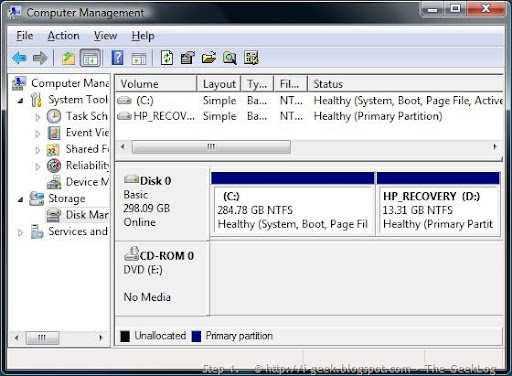
Step 1.

  • Ensure you have Administrative credentials, In Windows Vista, go to Control Panel > System and Maintenance > Administrative Tools, or on the My Computer context menu. Select Computer Management. In Vista, if you are prompted for an administrator password or confirmation, type the password or provide confirmation.
  • In Windows Server 2008 you need to go to Server Manager, found in the Administrative Tools folder or on the My Computer context menu.
  1. Next, scroll down till you get to the Storage section, and in it go to the Disk Management console.
  1. Select the disk you want to shrink, for example Drive C, as in our case.

Note: Shrinking any volume is fine as long as you make sure you leave enough space on the partition you are shrinking. For example, having a 40 GB system partition might seem too much at the beginning, but after a while you might find it to be less than optimal. You see, many applications such as Microsoft Office take tons of free space. So do Service Packs, hotfixes and other files. For a server running Windows Server 2008 this calculation might be different than on a workstation running Windows Vista, but in any case, make a mental note of this BEFORE shrinking your partitions.

vista partition1

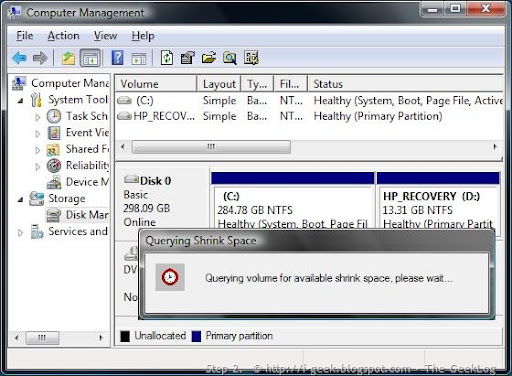
Step 2.

Quering volume for available shrink space, right click to query the partition it's C: in here.

vista partition2

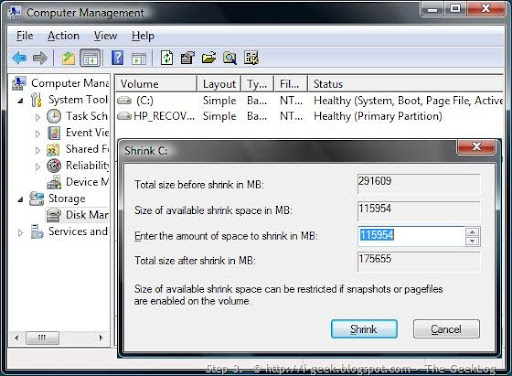
Step 3.

Disk Management showing the wizard to enter the amount of space to shrink in MB. Size of available shrink space can be restricted if snapshots or pagefiles are enabled on the volume.

Click Shrink to use the maximum allowable amount of space.

vista partition3

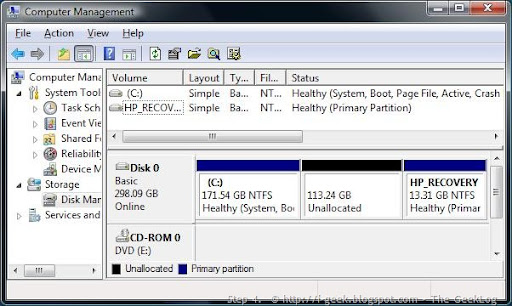
Step 4.

After clicking the Shrink button, a new unallocated space is visible, it's 113.24 GB in here.

vista partition4

Step 5.

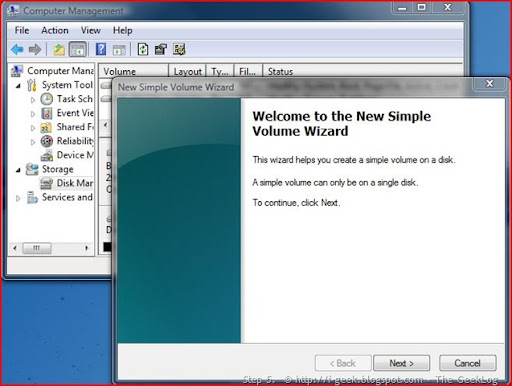
Now you might want to format the newly created partition on your Windows Vista. Creating a new volume in the space available after shrinking. The wizard helps you create a simple volume on  a disk.

vista partition5

Step 6.

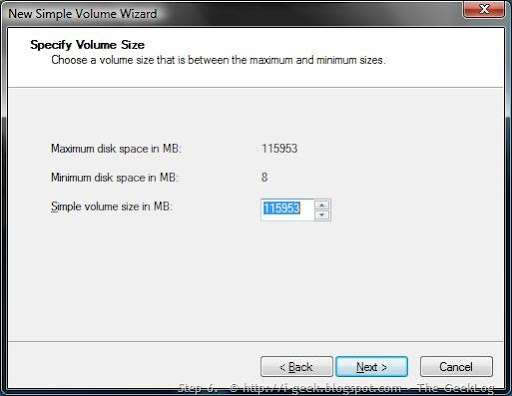
Specifying the Volume Size to create a new partition.

vista partition6

Step 7.

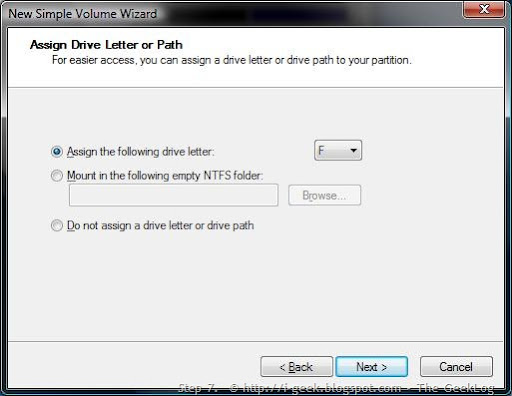
Assign the drive letter

vista partition7

Step 8.

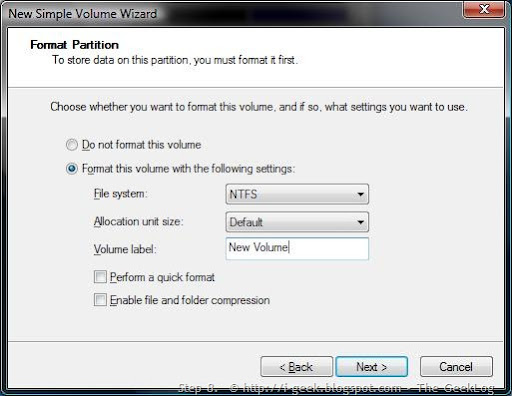
Partition format wizard: format as per your need of the file system NTFS or FAT, and assign a new name or volume label to it.

 vista partition8

Step 9.

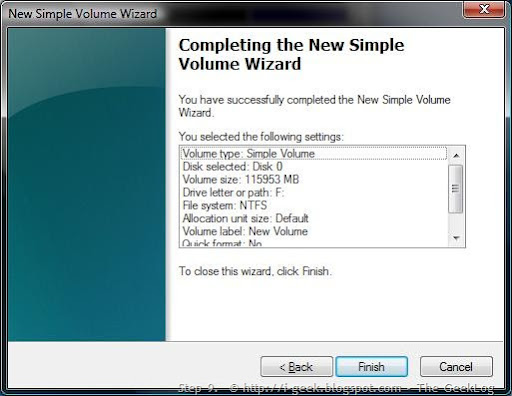
Click Finish to process formatting.

vista partition9 

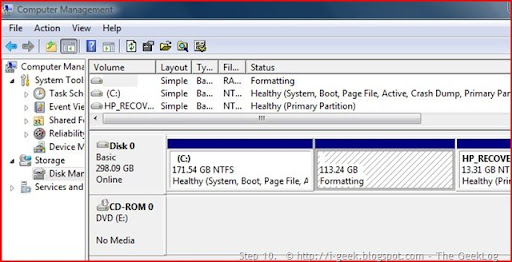
Step 10.

Formatting..

vista partition10

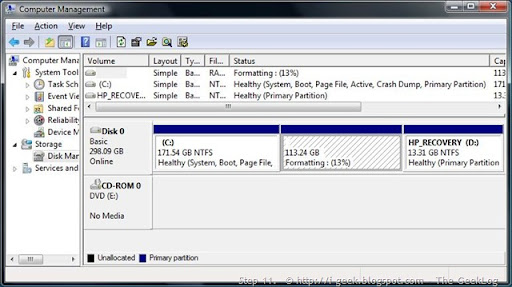
Step 11.

Formatting the new partition (result of shrinking), formatting is your Choice in NTFS (recommended) or FAT32.

vista partition11

Finally, You will have successfully created a new partition out of the freed space.

Hope this will solve your queries. Since the screenshots are real time capture @ our workshop, they are self-explanatory and will assist you a lot.

Please, read the volume III edition of this article : Shrinking a partition by using the CommandLine : Shrinking a Partition in Windows Vista/2008 - Part III

Read Volume I of this article: Shrinking a Partition in Windows Vista/2008 I : Read before you Act

Wednesday, April 30, 2008

How to copy data from a corrupted user profile to a new profile?

This article is taken from Help and Support of Microsoft.com
 
When you copy user data into a new profile, the new profile becomes a near duplicate of the old profile, and contains the same preferences, appearance, and documents as the old profile. If your old profile is corrupted in some way, you can move the files and settings from the corrupt profile to a new profile.

Note The method that is described in this article may not transfer the Outlook Express e-mail messages and address user data that are associated with the user profile where you are transferring data from. When you delete the old profile, you may delete that data if it you do not first transfer it by using other methods. For more information about transferring Outlook Express user data, click the following article number to view the article in the Microsoft Knowledge Base:
 

Create a New User Profile in Windows XP Professional

1. Log on as the Administrator or as a user with administrator credentials.
2. Click Start, and then click Control Panel.
3. Click User Accounts.
4. Click the Advanced tab, and then click Advanced.
5. In the left pane, click the Users folder.
6. On the Action menu, click New User.
7. Enter the appropriate user information, and then click Create.


Create a New User Profile in Windows XP Home Edition

1. Log on as the Administrator or as a user with administrator credentials.
2. Click Start, and then click Control Panel.
3. Click User Accounts.
4. Under Pick a task, click Create a new account.
5. Type a name for the user information, and then click Next.
6. Click an account type, and then click Create Account.


Copy Files to the New User Profile

1. Log on as a user other than the user whose profile you are copying files to or from.
2. In Windows Explorer, click Tools, click Folder Options, click the View tab, click Show hidden files and folders, click to clear the Hide protected operating system files check box, and then click OK.
3. Locate the C:\Documents and Settings\Old_Username folder, where C is the drive on which Windows XP is installed, andOld_Username is the name of the profile you want to copy user data from.
4. Press and hold down the CTRL key while you click each file and subfolder in this folder, except the following files:
Ntuser.dat
Ntuser.dat.log
Ntuser.ini
5. On the Edit menu, click Copy.
6. Locate the C:\Documents and Settings\New_Username folder, where C is the drive on which Windows XP is installed, andNew_Username is the name of the user profile that you created in the "Create a New User Profile" section.
7. On the Edit menu, click Paste.
8. Log off the computer, and then log on as the new user.

Note You must import your e-mail messages and addresses to the new user profile before you delete the old profile. For more information, click the following article number to view the article in the Microsoft Knowledge Base.

Monday, April 30, 2007

Court favors Microsoft in patent fight

By PETE YOST, Associated Press Writer
 
WASHINGTON - The Supreme Court sided with Microsoft Corp. on Monday in a case that restricts the reach of U.S. patents overseas.
 

In a 7-1 decision, the court found that Microsoft is not liable in a patent dispute with AT&T.

The decision could impact other lawsuits against Microsoft and save the company billions because of the global scope of its operations.

AT&T had sued Microsoft, alleging computers running the Windows operating system infringe on an AT&T technology that compresses speech into computer code.

AT&T said it is entitled to damages for every Windows-based computer manufactured outside the United States which uses the digital speech coder system.

Microsoft acknowledged violations in the United States regarding the AT&T patent, while insisting the infringement should not be extended internationally.

AT&T said Microsoft ran afoul of a 1984 law making it patent infringement for a company to ship components of a patented product to a foreign country for assembly there.

Microsoft ships its Windows-operating system to foreign countries on master disks or via electronic transmissions. That data is copied by foreign companies which install it on the computers they manufacture.

"The presumption that United States law governs domestically but does not rule the world applies with particular force in patent law," Justice

Ruth Bader Ginsburg wrote in the majority opinion.

Neither Windows software nor a computer standing alone without Windows installed infringes AT&T's patent, Ginsburg added.

U.S. patent law is inapplicable to the export of blueprints and there is no reason to think that Congress intended "to place the information Microsoft dispatched from the United States in a separate category," Ginsburg wrote.

The Bush administration supported Microsoft in the case.

Microsoft and the Bush administration say computer code is not a component until it is copied onto a hard drive or installation disk.

Copying parts abroad for assembly and sale abroad is properly the subject of foreign law, the Justice Department solicitor general's office told the court.

In a separate unanimous ruling in this area, the justices said that a federal appeals court had gone too far in embracing a standard that has fueled an era of patent protection.

The court said a federal appeals court applied the standard in a manner that is too narrow and too rigid.

The case addresses one of the most basic issues in patent law: How to determine whether a product is obvious and therefore not worthy of a patent.

"Granting patent protection to advances that would occur in the ordinary course without real innovation retards progress and may ... deprive prior inventions of their value," wrote Justice

Anthony Kennedy.

In the case of KSR International Co. v. Teleflex Inc., the U.S. Court of Appeals for the Federal Circuit in the District of Columbia had upheld a patent for adjustable gas pedals. This court hears all appeals in the field of patents.

The legal test at issue in the Teleflex lawsuit has been criticized by the Bush administration as leading to an unwarranted extension of patent protection to claimed inventions that are obvious. Critics of the test say it results in less competition and stifles innovation. Proponents warned that throwing out the standard would upset decades of settled law.

To invalidate a patent, a challenger must show that all parts of a claimed invention were known previously. In addition, the challenger must show that there is a prior "teaching, suggestion or motivation" to combine these prior technologies to produce the invention.

"Helpful insights" that the standard provides "need not become rigid and mandatory formulas," Kennedy wrote.

___

The Microsoft case is Microsoft v. AT&T, 05-1056

___

On the Net:

Supreme Court: http://www.supremecourtus.gov

Wednesday, August 27, 2008

Enhance your web browsing experience with IE7Pro with plug in for Windows Internet Explorer 7

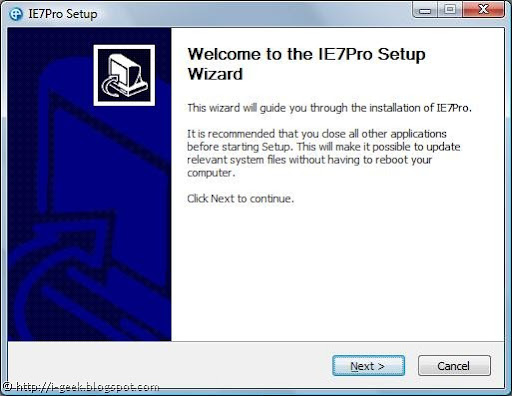
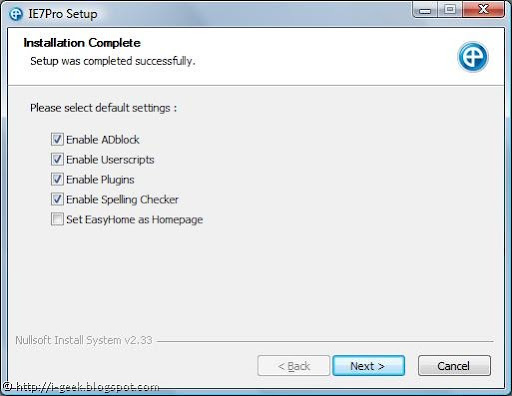
IE7 Pro SetupIE7Pro is a all-in-one plug in for Windows Internet Explorer 7. With IE7Pro installed once, you will never need to look after any tunings for better internet browsing experience than this.

Version 2.2 of IE7Pro as screencasted in here, shows many settings for IE7 with just a single click. Some of them include:

Includes a lot of IE tweaks, includes:
   * Crash recovery
   * Super Drag and Drop
   * Quick proxy switcher
   * Enhanced Tabbed Browsing
   * Mouse gestures
   * Hotkey customization
   * Address bar shortcutsIE7 Pro Setup Settings

With IE7Pro one can:

1.Manage ads, block unwanted ads with ADblock

Supports blocking all forms of advertisments, including Flash ads, rich media, fly-ins, slide-ins, pop-up, pop-under.
Filters DIVs , URLs, Images, Tables, iFrames. Visit AD Filter list.

2.Enable or disable Userscripts

The most powerful user script platform for IE

IE7 Pro's Google based search

(like the Grease Monkey extension for Firefox). Also included Easy homepage.

Visit http://www.iescripts.org for more user scripts and plugins.

3. Many plugins to be checked for

4.Enable Spelling Checker as in Firefox

Checks spelling errors while composing mails, blog entries or any text area entries using the spellchecking engine from OpenOffice. Supports up to 16 languages.

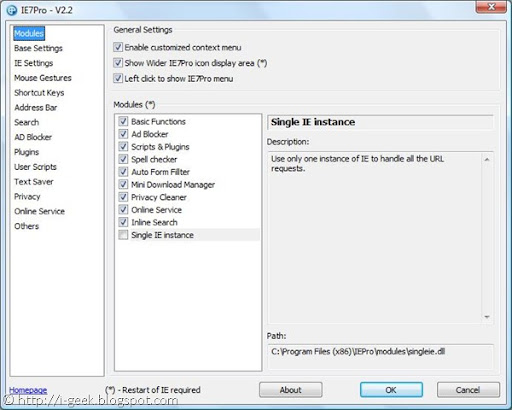
IE7 Pro v2.2 Modules

Auto Form Filler:

A simple form & password manager and form filler which completely automates password entering and form filling.

It also includes Text Saver, which lets you restore the lost text while composing mails and text area posts in case of crashes.

Mini Download Manager:

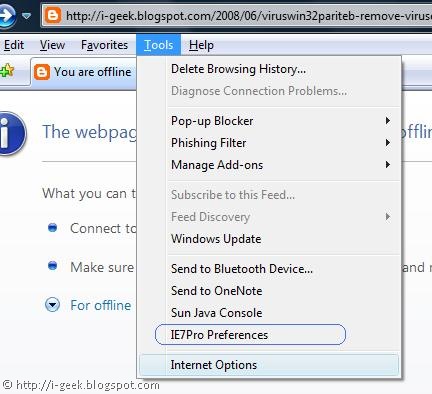
IE7 Pro preferences

The smallest download manager for IE, It supports resuming Downloads and simultaneous downloads.

Inline Search:

Search the page as you type, like the Find as you type feature of Firefox.

Single IE Instance:

Use only one instance of IE to handle all the URL requests.

Accu Weather:

Display the local weather in the statusbar, Copy from Windows vista accu weather gadgets

Alexa Rank or Google PageRank:

Display the website's Alexa and Google Page Rank.

Book Burro- Remixing the bookstore:

Compare book prices from various book stores

Download Video:

Save video clips from YouTube, Google Video, Myspace, Metacafe, Break.com, Putfile, Dailymotion and Sevenload.

Download Video from YouTube:

adds a link to download flv from YouTube

*youtube.com/*v=*

Other features include Flickr Rich Edit, GMail CSS Skin, Google Blogsearch, Google Images NoFrame link, Google Link Preview, GoogleX, Myspace custom style remover, Myspace Notifier, RSS+Atom Feed Subscribe Button, Show Password onMouseOver, YouTube Resizer, YouTube.com- dark gray redesign http://userstyles.org/

Download the latest version of IE7Pro now to fully customize your IE Experience @ http://www.ie7pro.com/

Tuesday, February 27, 2007

Help Upgrading USB Audio Controller

I have a USB Audio Device (Sound Card- C-Media USB Headphone Set), specfications goes:
 
USB Audio Device
 
Integrated 2 Channel
USB Audio Controller
 
Device Type: Sound, video and game controllers
Manufacturer: Generic USB Audio
Location: Location 0 (C-Media USB Headphone Set)
 
Driver Provider: Microsoft
Driver Date: 7/1/2001
Driver Version: 5.1.2535.0
Digital Signer: MIcrosoft Windows Publisher
Driver File: //Windows/system32/drivers/USBAUDIO.sys
 
Remark(s): The device is enabled and functioning properly.
 
Upgrade Woes goes:
 
Searched the net for an updated drivers for a couple of providers but couldn't find the apt ones. Even Window's Update Driver Wizard seem unable to find updates for USBAUDIO.sys driver file.
 
I like to enable Virtual 5.1 Sound Track on the device. It has been going well with 3D Sound(AC-3). Where can I find Advanced Environment Effects, Sizes and Band/Pre-set Equalizers, EAX, Speaker Shifter for my device? I think these are Software Value added for music and gaming. Any idea?I also like to know about Xearphone.
 
Is there anything to do with <Digital Class-B Power Amplifier> which is built-in component inside the device, it's PD 552.
 
Please, help me upgrade my SOUND Xperience!

Sunday, March 09, 2008

Preventing Infection : How to prevent infection of Virus? : Concerning Viruses III

The most reliable and thought-out measures cannot provide you with 100% protection from computer viruses and Trojans, but, with this set of rules in mind, you will significantly lower the likelihood of virus attacks and the level of potential damage.  One of the basic methods of battling viruses is, as in medicine, well-timed prevention. Computer prophylactics involve a rather small number of rules that, if complied with, can significantly lower the likelihood of being infected with a virus and losing data. Below is a listing of basic safety rules which, if followed, will help mitigate the risk of virus attacks.

Rule No. 1: Use antivirus software and Internet security programs. To do so:

  • Install Anti-Virus program as soon as possible.

  • Regularly update the application databases. Updates may be performed several times a day in the event of virus epidemics. Under such circumstances application databases on antivirus software update servers update immediately.

  • Select the security settings recommended by the antivirus company for your computer. You will be protected constantly from the moment the computer is turned on and it will be harder for viruses to get onto your computer.

  • Configure the settings for complete scan recommended by the experts of your antivirus company and schedule scans for at least once per week.

Rule No. 2: Use caution when copying new data to your computer:
  • Scan all removable storage drives for viruses (floppies, CD/DVDs, flash drives, etc.) before using them.

  • Treat e-mails with caution. Do not open any files that have come through e-mail if you are not certain that they were really supposed to be sent to you, even if they were sent by people you know.

  • Be careful with information obtained through the Internet. If any web site suggests that you install a new program, be certain that it has a security certificate.

  • If you are copying an executable file from the Internet or local network, be sure to scan it with Anti-Virus.

  • Use discretion when selecting which web sites you visit. Many sites are infected with dangerous script viruses or Internet worms.

Rule No. 3: Pay close attention to information from Antivirus company websites.

In most cases, the Antivirus company announces a new outbreak long before it reaches its peak. The corresponding likelihood of infection is still low, and you will be able to protect yourself from new infection by downloading updated application databases.

Rule No. 4: Do not trust virus hoaxes, such as prank programs and e-mails about infection threats.
Rule No. 5: Use the Microsoft Windows Update tool and regularly install Microsoft Windows operating system updates.
Rule No. 6: Buy legit copies of software from official distributors.
Rule No. 7: Limit the number of people who are allowed to use your computer.
Rule No. 8: Lower the risk of unpleasant consequences of a potential infection:
  • Back up data regularly. If you lose your data, the system can fairly quickly be restored if you have backup copies. Store distribution floppies, CDs, flash drives, and other storage media with software and valuable information in a safe place.

  • Create a Rescue Disk that you can boot with, using a clean operating system.

Rule No. 9: Review the list of software installed on your computer on a regular basis. This can be accomplished using the Install/Remove Programs service under Control Panel or simply by viewing the contents of the Program Files folder and the startup folder. To do so, open Install/Remove Programs in the Control Panel or view the contents of the Program Files directory or the startup folder. You can discover software here that was installed on your computer without your knowledge, for example, while you were using the Internet or installing a program. Some of them are almost always potentially dangerous programs.

Related Links:

The information presented herein is adapted from Help and Support Section of the Kaspersky Anti-Virus 7.0, details of the notes can be pertained from related links as following:

Subscribe to geeklog feed Bookmark and Share

Design by Free blogger template