Showing posts sorted by date for query virus. Sort by relevance Show all posts

Sunday, April 26, 2009

Kaspersky Lab announces anti-virus for Windows 7

Kaspersky Lab, makers from Kaspersky Antivirus (KAV) has announced the Kaspersky Anti-Virus for Windows 7 beta users and plans to extend the compatibility with full release of Windows 7.kaspersky-for-windows7-logo

Kaspersky Lab’s suite of security offerings will be available to Windows 7 users immediately following the launch of the new operating system. According to the lab more than 300,000 people over two and a half months have installed the version of KAV for Windows 7. They have extended thanks to collaboration with Microsoft for receiving an exceptional amount of valuable feedback from beta testers that will enable them to ensure that their products are fully compatible with Windows 7 upon final release.

More news related to Kaspersky Antivirus and Windows 7 from previous posts on this geeklog.

Monday, February 09, 2009

How to Remove or Delete AutoPlay Handler from the Options List in Vista and XP

Before you continue to read this article about how to remove autorun virus or autorun options list, we would suggest you to visit our download section in a separate tab(Windows) and continue here.

This article or Windows action requires changing Windows Registry so please be advised to back up you registry before modifying any key.

AutoPlay or AutoRun dialog window will pop up when an removable drive, portable device such as digital camera and media player or CD/DVD disc been inserted into computer or placed into optical drive, with plenty of action choices in a list of options for users to choose to perform on the just connected drive and drive contents. Each item in the AutoPlay list is a handler installed by various applications to show as an option for a particular events or content types such as Pictures, Videos, and Mixed.

Windows by default has several AutoPlay handlers, and other third-party programs, especially media player such as MusicMatch Jukebox and RealPlayer, and image burning software such as Nero will add their own AutoPlay handlers and shortcuts into the list. Over the time, the AutoPlay list can get longer and longer, and some entries can become invalid or orphaned when the program has been uninstalled by the AutoPlay handlers are not removed.

To delete and remove an entry or item from AutoPlay menu, its corresponding handler in the registry has to be deleted. To make the management of AutoPlay entries easier, such as to delete and remove an unwanted or unneeded entry in AutoPlay menu, an AutoPlay cleanup utility is available. Alternatively, you can opt for third party utility tools- Autoplay clean up utility. Visit our download section.

It’s also possible to manually edit the system registry to remove the AutoPlay handlers. The AutoPlay handlers are stored at the following registry location:

HKEY_LOCAL_MACHINE\Software\Microsoft\Windows\CurrentVersion\Explorer\AutoplayHandlers\Handlers\

Above registry key stores handler settings, which is the action to perform when selected on AutoPlay.

HKEY_LOCAL_MACHINE\Software\Microsoft\Windows\CurrentVersion\Explorer\AutoplayHandlers\EventHandlers\

Above registry key stores various event names, which contains associated handlers. Which mean all entries added as the value for the event will be shown as an option when the particular event happens and trigger the AutoPlay menu dialog.

Note that any wrong modification to the registry may cause instability. So if you plan to remove any handlers directly from the registry, backup the key before modifying.

Suggested Readings:

Please, read about Windows utility programs such as Tuneup utility and Vista Manager. Since they are very easy to use programs, you should find them easy to accomplish almost all task to enhance your system.

Portion of this test is taken from PC Tips Box @ http://www.pctipsbox.com/how-to-remove-or-delete-autoplay-handler-from-the-options-list-in-vista-and-xp/

Wednesday, February 04, 2009

Latest tech news with Obama Virus, GEARS OF WAR GAME, Firefox,

WORM FLOATS OBAMA'S HEAD ON YOUR DESKTOP
The odds are pretty good that this will never happen to you, but should a floating head of U.S. President Barack Obama pop up on your desktop Monday morning, know this: You've been hit with the Obama worm. Though it is not detected by any antivirus products right now, it is not considered to be a serious threat because it has infected so few systems. Because antivirus programs don't detect it yet, it's also hard to know when you've been infected. For more Google the news.

GEARS OF WAR GAME RENDERED UNPLAYABLE BY FLAWED DRM
The game Gears of War suddenly 'expired' on PCs on the 28th of January this year. The DRM (Digital Rights Management) associated with the game has a flaw which renders the game unplayable post that date. Gamers are angered by this premature expiry and the forum of the game developer, Epic, is abuzz with complaints. A 'super moderator' on Epic's forum has said "We have been notified of the issue and are working with Microsoft to get it resolved. Sorry for any problems related to this. I'll post more once we have a resolution".

FIREFOX 3.1 BETA 3 DELAYED AGAIN
The release of the third beta of Mozilla's Firefox 3.1 web browser has been delayed again after 18 bugs were detected in TraceMonkey - the browser's JavaScript engine. Mozilla was unable to confirm whether the delay, the second one this month, would affect the releases of the final version of the browser.

Sunday, December 28, 2008

Samsung Shipped Infected Digital Picture Frames

For the second year in a row, some of those digital photo frames lying under the Christmas tree may come with a nasty surprise.

Samsung says that CDs that shipped with many models of its digital photo frames may have included a malicious Trojan horse program that gives cyber criminals access to the PC.

The malicious software, known as W32.Sality.AE lies in the XP version of Samsung's Frame Manager 1.08 software, which ships with many other models of Samsung frames.

A malware reaches a host PC only if Frame Manager is loaded from the CD, which can convert the digital photo frame to a USB monitor. It doesn't affect Windows Vista users. W32.Sality.AE has been known in the security community since April and is detected by antivirus software.

CDs with malicious code may have also shipped with the digital photo frame models SPF-75H, SPF-76H, SPF-85H, SPF-85P, SPF-105P, Samsung wrote in an alert (pdf) it issued in late November.

Samsung recommends users to download and install the updated version of Frame Manager XP software available from the Download Center at Samsung.com.

Earlier this week, Amazon.com issued an alert saying the worm affects Amazon buyers of the SPF-85H 8-inch digital photo frames sold between October and December 2008 for about US$150.

The story was first reported by German publication PC Professionell earlier this month.

This is not the first time that viruses have shipped along side digital photo frames. Last year, retailer Best Buy Stores said it had sold digital picture frames that were contaminated with a computer virus. The digital picture frame was an in-house brand called Insignia, and that specific model with the virus was later discontinued by Best Buy.

Story from http://pcworld.in/

Sunday, December 21, 2008

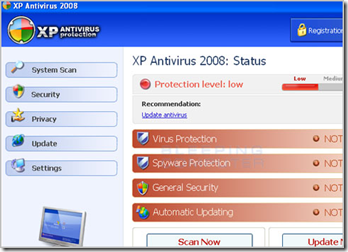
How to remove XP Antivirus 2008, XP Antivirus 2009, and XPAntiVirus (A Complete Removal Instructions)

Everywhere where ever I go, whoever calls for maintaining their system clean, whoever have been browsing a lot and with somehow near to thug periphery of XP Antivirus. Hope this collective article, might help for a lot of people like you to remove Malwares and Spywares like this.

What XP Antivirus does:

This is a slight background info, skip to complete removal steps of XP Antivirus 2008.

imageXP Antivirus 2008, XP Antivirus 2009, and XPAntiVirus are scoundrel (oops! can there be a better word then this) antivirus programs, when run, display false results as a tactic to scare you into purchasing the software. Older versions of XP Antivirus would create 9 entries in your Windows Registry that impersonate infections on your machine, according to BleepingComputer.com. In reality, though, these registry entries were harmless and had absolutely no effect on your computer. Instead, these entries were set so that XP AntiVirus can find them when scanning your computer and report them as infections. The newer of versions of the program , such as XP Antivirus 2008 and XP Antivirus 2009, instead just display false results when scanning your computer that state infections were found. In order to remove these fake infections, though, you would first need to purchase the software as the trial does not allow you to remove them.

While running, XP Antivirus will also display fake alerts stating that you are infected or under attack from some type of threats. These alerts are fake and can be ignored. If you do click on the alert, though, it will prompt you to purchase the software. Examples of text contained in these alerts can be found below.

Privacy Violation alert!
XP antivirus detected Privacy Violation. Some program is secretly sending your private data to untrusted internet host. Click here to block this activity by removing threats (Recommended).

or

System files modification alert!
Some critical system files of your computer were modified by malicious program. It may cause system instability and data loss. Click here to block unathorised <sic> modification by removing threats (Recommended).

Removing XP Antivirus 2008:

@ Don't purchase this fraudware ar any cost, there is no harm actually to your system so if you can, remove all traces of this Malware if know by any way such as Process Explorer or Tune Up Utilities Process Manager or Vista Manager's Process Manager or use any software that's soft for you. THIS IS THE MOST IMPORTANT WAY TO REMOVE XP ANTIVIRUS 2008. Find complete list of related processes of this malware, below.

@   For Add/Remove Programs control panel entry click here XP antivirus 1.0.1

References:


Don't forget to read the discussion on Getting rid of Kinza virus : How do I remove kinza virus?

  • The official link to Kaspersky Antivirus - kaspersky.com

  • Choose an apt security software for you, read Reinvesting in Security? THINK ONCE AGAIN!

  • Search for more virus related articles and registry in this i-geek blog

  • The easiest way to remove viruses/malwares without installing any antivirus software

  • Monday, November 03, 2008

    How To Easily Remove the MonaRonaDona 'Virus'

    The MonaRonaDona Trojan is designed to scam infected users into shelling out $40 for a bogus scanner dubbed Unigray Antivirus. The scammers completed the hoax by positioning several forum posts from alleged victims touting the bogus Unigray Antivirus as a miracle cure for the MonaRonaDona 'virus'. In reality, removal is very simple and requires absolutely no tools, nor parting with any of your hard-earned cash. Just boot into safe mode and follow the directions below. Original Article here

    Difficulty: Easy

    Time Required: 15 minutes

    Here's How To Easily Remove the MonaRonaDona 'Virus':

    1. If you haven't already done so, boot into safe mode.

    2. Search for and delete the following folder, if found:

      C:\Program Files\UniGray Antivirus

      You may also wish to delete the following:

      C:\Program Files\RegistryCleanFix2008

    3. Search the global startup folder for the following file and delete the file if found:

      SRVSPOOL.EXE

      By default, the global startup folder location is
      C:\Documents and Settings\All Users\Start Menu\Programs\Startup

    4. Click Start, click Run, type REGEDIT, and click OK. The Registry Editor will now open.

      Note: To avoid unwanted page wrapping, the following abbreviations are used in the steps below:

      HKCU = HKEY_CURRENT_USER
      HKLM = HKEY_LOCAL_MACHINE

    5. To fix the title bar changes to Internet Explorer and Outlook Express caused by MonaRonaDona, browse to the following keys and delete the values indicated:

      HKCU\Software\Microsoft\Internet Explorer\Main
      Delete value: Window Title

      HKLM\Software\Microsoft\Internet Explorer\Main
      Delete value: Window Title

      HKCU\Software\Microsoft\Outlook Express
      Delete value: WindowTitle

    6. To regain access to Task Manager, which was disabled by MonaRonaDona, browse to the following keys and delete the values indicated:

      HKCU\Software\Microsoft\Windows\CurrentVersion\Policies\System
      Delete value: DisableTaskMgr

      HKLM\Software\Microsoft\Windows\CurrentVersion\Policies\System
      Delete value: DisableTaskMgr

    7. You may also wish to delete the following:

      HKCU\Software\Microsoft\Windows\CurrentVersion\Run
      Delete value: RegistryCleanFixMFC

    8. Close the Registry editor by choosing File | Exit

    9. Reboot the computer normally. The system should now be free of the MonaRonaDona 'virus' and the system changes made by the Trojan should now be reversed.

    For begineers: How to Edit the System Registry & Windows System Registry Tutorial by About.com.

    Monday, October 27, 2008

    How To View Hidden Files and Folders

    By default, Windows does not display hidden files and folders. Virus writers often take advantage of this, by dropping hidden files to the system that the casual user can't see. Though the default isn't technically a rootkit, for the inexperienced computer user it can have the same effect. Here's how to change the default settings in Windows so you can view hidden files and folders.
     
    Difficulty: Easy
    Time Required: 5 minutes

    Here's How To View Hidden Files and Folders:

    1. Windows XP, 2000 users: To begin, double-click the My Computer icon on the desktop, then skip to Step 4.
    2. Windows Vista users: Click Start, then Control Panel. Click "Appearance and Personalization" then click the Folder Options icon and skip to Step 5.
    3. Windows ME, NT, 98, and 95 users: To begin, double-click the My Computer icon on the desktop, then skip to Step 6.
    4. Windows 2000 and XP users: Click Tools | Folder Options | View then skip to Step 7.
    5. Windows Vista: Click View then skip to Step 7.
    6. Windows ME/95/98/NT: Click View | Options | View
    7. Under Hidden files and folders, select "Show hidden files and folders"
    8. Now close the dialog boxes you have opened to perform this task. You should now be able to view hidden files and folders on the system. Note that this change may cause the hidden (and legitimate) file 'desktop.ini' to appear on the desktop.

    Tuesday, June 03, 2008

    Virus.Win32.Parite.b : Remove viruses and worms with ease and passion

     Virus.Win32.Parite.b : Remove viruses and worms with ease and passionNot again badly that my system got infected by something that resides at temporary folder with name ena1.tmp having size 172KB, sometimes the name ena1.tmp got itself replaced with other name. Whatever, not lately I restored off my system and scanned using the beta version of Kaspersky Antivirus 8, and the whole lot infected virus was determined to be Virus.Win32.Parite.b which was a step ahead from its parent Virus.Win32.Parite.a both of these are purely parasitic viruses which modify the code of the infected file. The infected file remains partially or fully functional.

    The KAV displayed the following notice every time the infected file/folder was scanned.

    Detected
    --------
    Status     Object
    ------       ------
    will be deleted when the computer is restarted: virus Virus.Win32.Parite.b File: C:\DOCUME~1\ADMINI~1\LOCALS~1\Temp\ena1.tmp//UPX

    To the sadness after the complete scanning and rebooting the system the virus was still resided at the %temp% folder. Later delving thoroughly, it was found that the virus Virus.Win32.Parite.b replicated itself into the System Volume Information system folder of the local drive and the pen drive as well. Surprisingly, in my JetFlash V110 pendrive there used to be no such system folder as System Volume Information. And with no further lingering, I just deleted it using TuneUp Shredder and all such unwanted files were deleted successfully, and finally a decisive full system scan was done to eliminate all the infected files and the virus itself.

    continue reading and exploring full source code of the virus below

    Malware Descriptions / Parasitic Classic Viruses section of the viruslist.com writes on parasitic viruses Virus.Win32.Parite.b as

    Parasitic viruses modify the code of the infected file. The infected file remains partially or fully functional.

    Parasitic viruses are grouped according to the section of the file they write their code to:

    • Prepending: the malicious code is written to the beginning of the file
    • Appending: the malicious code is written to the end of the file
    • Inserting: the malicious code is inserted in the middle of the file

    Inserting file viruses use a variety of methods to write code to the middle of a file: they either move parts of the original file to the end or copy their own code to empty sections of the target file. These are sometimes called cavity viruses.

    File and Boot Viruses here is very useful information on aliases and coding of the virus we are dealling with:

    Virus.Win32.Parite.b (Kaspersky Lab) is also known as: Win32.Parite.b (Kaspersky Lab), W32/Pate.b (McAfee),   W32.Pinfi (Symantec),   Win32.Parite.2 (Doctor Web),   W32/Parite-B (Sophos),   Win32/Parite.B (RAV),   PE_PARITE.A (Trend Micro),   W32/Parite (H+BEDV),   W32/Parite.B (FRISK),   Win32:BackDoor-Servu (ALWIL),   Win32/Parite (Grisoft),   Backdoor.FtpUServ.A (SOFTWIN),   W32/Parite.B (Panda),   Win32/Parite.B (Eset)

    This parasitic memory resident virus is functionally identical to Win32.Parite.a. It differs from Parite.a only in the key that it creates in the system registry:

    [HKEY_CURRENT_USER\Software\Microsoft\Windows\CurrentVersion\Explorer\PINF]

    Details of Virus.Win32.Parite.a (Kaspersky Lab) is also known as: Win32.Parite.a (Kaspersky Lab), W32/Pate.a (McAfee),   W32.Spybot.Worm (Symantec),   Win32.Parite.1 (Doctor Web),   W32/Parite-A (Sophos),   Win32/HLLW.SpyBot (RAV),   PE_PARITE.A (Trend Micro),   W32/Parite (H+BEDV),   W32/Spybot.IA (FRISK),   Win32:SpyBot-GEN (ALWIL),   Win32/Parite (Grisoft),   Win32.Parite.A (SOFTWIN),   Trojan.Spybot.gen-3 (ClamAV),   W32/Spybot.BE.worm (Panda),   Win32/Parite.A (Eset)

    The virus consists of a dropper, which is witten in assembler, and the virus part itself, written in Borland C++.  When an infected file is launched, the control flow is passed to the virus dropper, which writes the virus to a temporary file and executes its infection procedure. The virus searches for Win32 EXE PE files with .scr and .exe extensions on all logical drives of computer, and also in shared resources of local network, and infects them.

    The virus doesn't manifest itselfs presence in any way. The structure of infected file looks like this:

    Host file
    Virus
    dropper - drops "main" to TEMP dir and executes it.
    main - searches for files and infects them, e.t.c.

    The AutoRun.inf file contained the following code, think this is system dependent and further it directly attacks the system shell command.

    [AutoRun]
    open=
    shell\open\Command=System~1\com1.{29ec2020-4aea-1069-a2dd-08002b40409d}\ntldr.pif
    shell\open\Default=1
    shell\explore\Command=System~1\com1.{29ec2020-4aea-1069-a2dd-08002b40409d}\ntldr.pif

    In actual, the above code won't be functional as I have changed the values in brackets. This is all about how the virulent code looks like.

    The virus treated report from Kaspersky Antivirus 8 Beta Version

    Detected
    --------
    Status Object
    ------ ------
    deleted:
    virus Packed.Win32.PolyCrypt.b File: J:\portables\proceeded\processed\Boss.exe/bossinv.exe
    deleted:
    Trojan program Backdoor.Win32.Skrat.e File: J:\processed\setup - mbhttpbf.exe//data0001
    deleted:
    malware HackTool.Win32.VB.ao File: J:\setup - mbhttpbf.exe//data0003
    deleted:
    Trojan program Trojan-Spy.Win32.WebPageRecorder.b File: J:\setup - Stealth Web Page Recorder.exe/WebPageRecorder.exe
    deleted:
    Trojan program Trojan-PSW.Win32.XPassLogger File: J:\ \portables\proceeded\processed\setup - XP Login Password.exe/kbfiltr.sys
    deleted:
    virus Packed.Win32.PolyCrypt.b File: J:\ \processed\Blazing Invisible Boss.exe/bossinv.exe
    deleted:
    Trojan program Trojan-PSW.Win32.Agent.eb File: J:\ \processed\Girls_boys.exe
    deleted:
    malware Nuker.Win32.Small.b File: J:\ \processed\send messages to IP.exe//UPX//Autoit
    deleted:
    Trojan program Backdoor.Win32.Skrat.e File: J:\ \processed\setup - mbhttpbf.exe//data0001
    deleted:
    malware HackTool.Win32.VB.ao File: J:\ \processed\setup - mbhttpbf.exe//data0003
    deleted:
    Trojan program Trojan-Spy.Win32.WebPageRecorder.b File: J:\ \processed\setup - Stealth Web Page Recorder.exe/web.dll
    detected:
    riskware not-a-virus:RiskTool.Win32.HideWindows File: G:\AUTOPLAY\DOCS\COMMON\CMDOW.EXE
    deleted:
    Trojan program Trojan-PSW.Win32.XPassLogger File: J:\ \processed\setup - XP Login Password.exe/kbfiltr.sys

    More more studies:

    Monday, May 19, 2008

    Using Kaspersky Online Scanner to scan PC for viruses and malwares for free

    HTML clipboard

    This is absolutely free service from Kaspersky Lab - the maker of KAV - antivirus program with the highest detection rates according to AV-Comparatives.org. The website page goes at the first line as

    Welcome to the Kaspersky Online Scanner! Use it to scan your PC for viruses and other malware for free. Warning: if you have installed Kaspersky Online Scanner Pro, please manually uninstall it using "Add/Remove Programs" before installing this version! Otherwise this version will not function correctly.

    Initially there is a small installation done followed by the choice for virus definitions, and rest assured - you never leave it stand alone if you are too prone to viruses and security infringing softwares. Based on Microsoft's ActiveX Technology, the Kaspersky Online Scanner works only with MS Internet Explorer 6.0 and higher. The major plus point is that the scanner has hourly updated AV database that means each time you launch the online scanner it's sure to be updated silently.

    Detection rates of antivirus programs

    If you're not in MSIE, then you can scan for individual files, including compressed ones, then you can scan them at File Scanner. If you would like to scan your entire computer for viruses, please use their free virus scan. To list the free virus scanning services from Kaspersky Lab:

    Wednesday, May 14, 2008

    The easiest way to remove kinza virus, Updates : Kinza.exe virus as removed by Kaspersky Antivirus

    You must read this topic ( Getting rid of Kinza virus : How do I remove kinza virus? ) before proceeding to the text below which is the extended portion of the update of the previous discussion on How to remove kinza virus? This is the easiest way to remove kinza virus!

    Below is the result of the Kinza.exe virus as removed by Kaspersky antivirus 7.

    Scan : completed
    ----------------
    Scanned: 756
    Detected: 1
    Untreated: 0
    Start time: 4/1/2008 11:09:30 AM
    Duration: 00:01:10
    Finish time: 4/1/2008 11:10:40 AM

    Detected
    --------
    Status Object
    ------ ------
    deleted: virus Worm.VBS.Autorun.i File: G:\kinza.exe//data.rar/boot.vbs


    Events
    ------
    Time Name Status Reason
    ---- ---- ------ ------
    4/1/2008 11:09:30 AM Logical disk sector: G ok scanned
    4/1/2008 11:09:30 AM File: G:\kinza.exe archive RarSFX
    4/1/2008 11:09:30 AM File: G:\kinza.exe//data.rar archive RAR
    4/1/2008 11:09:30 AM File: G:\kinza.exe//data.rar/archive comment ok scanned
    4/1/2008 11:09:30 AM File: G:\kinza.exe//data.rar/boot.vbs detected: virus 'Worm.VBS.Autorun.i'
    4/1/2008 11:09:31 AM File: G:\kinza.exe//data.rar/boot.vbs not disinfected postponed
    4/1/2008 11:09:31 AM File: G:\kinza.exe//data.rar/dxdlg.exe packed file NPack
    4/1/2008 11:09:31 AM File: G:\kinza.exe//data.rar/dxdlg.exe//NPack detected: riskware
    'not-a-virus:Monitor.Win32.ActMon.511'
    4/1/2008 11:09:31 AM File: G:\kinza.exe//data.rar/imapd.exe packed file NPack
    4/1/2008 11:09:31 AM File: G:\kinza.exe//data.rar/imapd.exe//NPack detected: riskware
    'not-a-virus:Monitor.Win32.ActMon.511'
    4/1/2008 11:09:31 AM File: G:\kinza.exe//data.rar/imapdb.dll detected: riskware 'not-a-virus:Monitor.Win32.ActMon.511'
    4/1/2008 11:09:31 AM File: G:\kinza.exe//data.rar/imapdb.exe packed file NPack
    4/1/2008 11:09:31 AM File: G:\kinza.exe//data.rar/imapdb.exe//NPack detected: riskware
    'not-a-virus:Monitor.Win32.ActMon.511'
    4/1/2008 11:09:31 AM File: G:\kinza.exe//data.rar/imapdc.dll detected: riskware 'not-a-virus:Monitor.Win32.ActMon.511'
    4/1/2008 11:09:32 AM File: G:\kinza.exe//data.rar/imapdd.dll ok iChecker
    4/1/2008 11:09:32 AM File: G:\kinza.exe//data.rar/imapde.dll ok iChecker
    4/1/2008 11:09:32 AM File: G:\kinza.exe//data.rar/wproxp.exe ok iChecker
    4/1/2008 11:09:32 AM File: G:\kinza.exe//data.rar/ActMon.ini ok scanned
    4/1/2008 11:09:33 AM File: G:\autorun.inf ok scanned
    4/1/2008 11:09:49 AM File: g:\kinza.exe archive RarSFX
    4/1/2008 11:09:49 AM File: g:\kinza.exe//data.rar archive RAR
    4/1/2008 11:09:49 AM File: g:\kinza.exe//data.rar/archive comment ok scanned
    4/1/2008 11:09:49 AM File: g:\kinza.exe//data.rar/boot.vbs detected: virus 'Worm.VBS.Autorun.i'
    4/1/2008 11:10:35 AM File: g:\kinza.exe backed up
    4/1/2008 11:10:37 AM File: g:\kinza.exe//data.rar/dxdlg.exe packed file NPack
    4/1/2008 11:10:37 AM File: g:\kinza.exe//data.rar/dxdlg.exe//NPack detected: riskware
    'not-a-virus:Monitor.Win32.ActMon.511'
    4/1/2008 11:10:37 AM File: g:\kinza.exe//data.rar/imapd.exe packed file NPack
    4/1/2008 11:10:37 AM File: g:\kinza.exe//data.rar/imapd.exe//NPack detected: riskware
    'not-a-virus:Monitor.Win32.ActMon.511'
    4/1/2008 11:10:38 AM File: g:\kinza.exe//data.rar/imapdb.dll detected: riskware 'not-a-virus:Monitor.Win32.ActMon.511'
    4/1/2008 11:10:38 AM File: g:\kinza.exe//data.rar/imapdb.exe packed file NPack
    4/1/2008 11:10:38 AM File: g:\kinza.exe//data.rar/imapdb.exe//NPack detected: riskware
    'not-a-virus:Monitor.Win32.ActMon.511'
    4/1/2008 11:10:38 AM File: g:\kinza.exe//data.rar/imapdc.dll detected: riskware 'not-a-virus:Monitor.Win32.ActMon.511'
    4/1/2008 11:10:38 AM File: g:\kinza.exe//data.rar/imapdd.dll packed file NPack
    4/1/2008 11:10:39 AM File: g:\kinza.exe//data.rar/imapdd.dll//NPack ok scanned
    4/1/2008 11:10:39 AM File: g:\kinza.exe//data.rar/imapdd.dll ok scanned
    4/1/2008 11:10:39 AM File: g:\kinza.exe//data.rar/imapde.dll packed file NPack
    4/1/2008 11:10:39 AM File: g:\kinza.exe//data.rar/imapde.dll//NPack ok scanned
    4/1/2008 11:10:39 AM File: g:\kinza.exe//data.rar/imapde.dll ok scanned
    4/1/2008 11:10:39 AM File: g:\kinza.exe//data.rar/wproxp.exe packed file NPack
    4/1/2008 11:10:39 AM File: g:\kinza.exe//data.rar/wproxp.exe//NPack ok scanned
    4/1/2008 11:10:39 AM File: g:\kinza.exe//data.rar/wproxp.exe ok scanned
    4/1/2008 11:10:39 AM File: g:\kinza.exe//data.rar/ActMon.ini ok scanned
    4/1/2008 11:10:40 AM File: g:\kinza.exe deleted


    Statistics
    ----------
    Object Scanned Dangerous objects Untreated Deleted Moved to Quarantine Archives Packed files
    Password protected Corrupted
    ------ ------- ----------------- --------- ------- ------------------- -------- ------------
    ------------------ ---------
    All objects 756 1 0 1 0 6 31 0 0
    G:\ 756 1 0 1 0 6 31 0 0


    Settings
    --------
    Parameter Value
    --------- -----
    Security Level Recommended
    Action Prompt for action when the scan is complete
    Run mode Manually
    File types Scan all files
    Scan only new and changed files No
    Scan archives all
    Scan embedded OLE objects all
    Do not scan archives larger than No
    Skip if scan takes longer than No
    Parse email formats No
    Scan password-protected archives No
    Use iChecker technology Yes
    Use iSwift technology Yes
    Register information about dangerous objects in application statistics Yes
    Rootkit scan Yes
    Extended rootkit scan No
    Use heuristic analyser Yes
    Heuristic analyser level 3

    The ultimate benefit is that there is no need to download kinza virus removal tool as you can neutralize kinza.exe virus with the help of Kaspersky Antivirus, even the trial version functions well.

    Sunday, May 04, 2008

    Microsoft to Halt Hotmail Access via Outlook Express

    In the latest death knell for Outlook Express, Microsoft announced Thursday that it will turn off access to its Web-based Hotmail service from the desktop e-mail software at the end of June.
     
     Outlook Express users who want to continue to access their Hotmail accounts offline after June 30 are being encouraged by Microsoft to download its free Windows Live Mail software.
     
     Users will still be able to use Outlook, the big brother of Outlook Express, to read their Hotmail messages offline, but first they may have to upgrade their Outlook Connector synchronization software, according to information posted online today by Scott Hammer, a Microsoft e-mail support manager.
     
     Hammer said that users of the paid Hotmail Plus service will also still be able to use any other desktop e-mail client that is POP3-compliant, such as the open-source Thunderbird software. Macintosh users, meanwhile, can continue using Microsoft's Entourage e-mail client for the Mac to access Hotmail, which is the second most popular Web mail service in the U.S. behind Yahoo Mail, according to market research firm HitWise Pty.
     
     Outlook Express first appeared in 1997, when it was bundled with Internet Explorer 4.0. At one point the most popular e-mail software for Windows users, the technology saw its usage start to decline after suffering major virus and malware problems early this decade. Microsoft's last update of the software, Outlook Express 6, was released in August 2004.
     
     In a blog post at Microsoft's e-mail technical support Web site, Hammer said that Microsoft is disabling the DAV e-mail protocol used by Outlook Express to download messages because it is too slow for the larger e-mail in-boxes now in use. For instance, the Windows Live service offers Hotmail users 5GB in-boxes free of charge.
     
     Instead of DAV, Windows Live Mail uses a new technology called DeltaSync to replicate e-mail, contacts and other data between Hotmail and a user's PC. Microsoft says DeltaSync is faster because it only downloads new or modified messages and headers from the Hotmail server, whereas DAV downloaded everything. But, Hammer wrote, "the new protocol unfortunately is not supported by Outlook Express, and support would require too many changes to the Outlook Express software."
     
     Released last November, Windows Live Mail is a successor to both Outlook Express and the Windows Mail client that shipped with Windows Vista . New features above and beyond the improvements that were in Windows Mail include support for RSS feeds, improved photo-sharing and increased integration with other cloud-based Windows Live online services.
     
     This reporter's main trepidation about moving to Windows Live Mail was how well it would import my existing Outlook Express messages and contacts. The experience was fine, though: after setup, Windows Live Mail automatically searched for and found the right folders. Importing more than 10,000 e-mails took about 15 minutes.
     

    Friday, April 18, 2008

    Create and Publish your own registry hacks

    Want to deal with registry files. It's easy, Creating and Publishing your own registry files/hacks is as simple as abc. Here comes a little but sufficient guides. Create hacks from syntax given below and save the file with extension .reg, don't forget to put disclaimer or other safe points while publishing.

    The syntax of the .reg file

    Registry Editor Version
                              // a blank line
    [RegistryPath1]
    "DataItemName1"="DataType1:DataValue1"
    "DataItemName2"="DataType2:DataValue2"
                              // a blank line
    [RegistryPath2]
    "DataItemName3"="DataType3:DataValue3"

    Example:

    Windows Registry Editor Version 5.00

    [HKEY_CURRENT_USER\Control Panel\Desktop]
    "AutoEndTasks"="1"
    "DragWidth"="4"
    "FontSmoothing"="2"
    "FontSmoothingOrientation"=dword:00000001
    "FontSmoothingType"=dword:00000001
     

    [HKEY_CURRENT_USER\Software\Microsoft\Windows\CurrentVersion\Explorer]
    "DesktopProcess"=dword:00000001

    Remember that registry is backward compatible. Windows XP has Windows Registry Editor Version 5 while previous versions had Regedit 4. But regedit 4 work on XP besides Windows 98 and NT systems. Whereas Regedit 5 works only on XP/2000 not on 98/NT.

    This hack related to desktop and Windows Explorer are taken from previous posts in this blog.

    Monday, April 07, 2008

    Dealling with ActMon Computer Monitoring an Spyware

    Type: Spyware
    Name: ActMon Computer Monitoring
    Version: 5.20
    Publisher: ActMon Software
    Risk Impact: High
    Systems Affected: Windows 98, Windows 95,  Windows Me, Windows NT, Windows 2000, Windows XP

    The following instructions pertain to all current and recent Symantec antivirus products, including the Symantec AntiVirus and Norton AntiVirus product lines.

    • Disable System Restore (Windows Me/XP).

    • Update the virus definitions.

    • Run a full system scan.

    • Delete any values added to the registry.

    For specific details on each of these steps, read the following instructions.

    1. To disable System Restore (Windows Me/XP)

    If you are running Windows Me or Windows XP, we recommend that you temporarily turn off System Restore. Windows Me/XP uses this feature, which is enabled by default, to restore the files on your computer in case they become damaged. If a virus, worm, or Trojan infects a computer, System Restore may back up the virus, worm, or Trojan on the computer.

    Windows prevents outside programs, including antivirus programs, from modifying System Restore. Therefore, antivirus programs or tools cannot remove threats in the System Restore folder. As a result, System Restore has the potential of restoring an infected file on your computer, even after you have cleaned the infected files from all the other locations.

    Also, a virus scan may detect a threat in the System Restore folder even though you have removed the threat.

    For instructions on how to turn off System Restore, read your Windows documentation, or one of the following articles:

    How to disable or enable Windows Me System Restore?
    How to turn off or turn on Windows XP System Restore?

    Note: When you are completely finished with the removal procedure and are satisfied that the threat has been removed, reenable System Restore by following the instructions in the aforementioned documents.

    2. To update the virus definitions

    Update your Antivirus Program and  Virus Definitions ASAP.

    Running LiveUpdate, which is the easiest way to obtain virus definitions.
    Downloading the definitions using the Intelligent Updater: The Intelligent Updater virus definitions are posted daily. You should download the definitions from the Symantec Security Response Web site and manually install them. To determine whether definitions for this threat are available by the Intelligent Updater, refer to Virus Definitions (Intelligent Updater).

    3. To run a full system scan

    Run a full system scan.
    If any files are detected, follow the instructions displayed by your antivirus program.
    Important: If you are unable to start your Symantec antivirus product or the product reports that it cannot delete a detected file, you may need to stop the risk from running in order to remove it. To do this, run the scan in Safe mode. For instructions, read the document, How to start the computer in Safe Mode. Once you have restarted in Safe mode, run the scan again.

    After the files are deleted, restart the computer in Normal mode and proceed with the next section.

    Warning messages may be displayed when the computer is restarted, since the threat may not be fully removed at this point. You can ignore these messages and click OK. These messages will not appear when the computer is restarted after the removal instructions have been fully completed. The messages displayed may be similar to the following:

    Title: [FILE PATH]
    Message body: Windows cannot find [FILE NAME]. Make sure you typed the name correctly, and then try again. To search for a file, click the Start button, and then click Search.

    4. To delete the value from the registry

    Important: Back up the registry before making any changes to it. Incorrect changes to the registry can result in permanent data loss or corrupted files. Modify the specified subkeys only. For instructions refer to the document: How to make a backup of the Windows registry?.

    Click Start > Run.
    Type regedit
    Click OK.

    Note: If the registry editor fails to open the threat may have modified the registry to prevent access to the registry editor. Security Response has developed a tool to resolve this problem. Download and run this tool, and then continue with the removal.


    Navigate to and delete the following entries:

    HKEY_LOCAL_MACHINE\SOFTWARE\Microsoft\Windows\CurrentVersion\policies\Explorer\Run\"srvprc" = ""%System%\srvprc.exe" -at"
    HKEY_LOCAL_MACHINE\SOFTWARE\Microsoft\Windows\CurrentVersion\policies\Explorer\Run\"wskrnl" = ""%System%\wskrnl.exe" -at"

    Navigate to and delete the following registry subkeys:

    HKEY_LOCAL_MACHINE\SOFTWARE\srvprc
    HKEY_LOCAL_MACHINE\SOFTWARE\wskrnl
    HKEY_LOCAL_MACHINE\SYSTEM\ControlSet001\Services\wskrnlc
    HKEY_LOCAL_MACHINE\SYSTEM\CurrentControlSet\Services\wskrnlc

    Restore the following registry entries to their original values, if required:

    HKEY_LOCAL_MACHINE\SYSTEM\ControlSet001\Control\Class\{4D36E96B-E325-11CE-BFC1-08002BE10318}\"UpperFilters" = "kbdclass[EXTENDED ASCII CHARACTER 191]wskrnlc"
    HKEY_LOCAL_MACHINE\SYSTEM\CurrentControlSet\Control\Class\{4D36E96B-E325-11CE-BFC1-08002BE10318}\"UpperFilters" = "kbdclass[EXTENDED ASCII CHARACTER 191]wskrnlc"
    HKEY_LOCAL_MACHINE\SYSTEM\ControlSet001\Enum\ACPI\PNP0303\4&5289e18&0\Control\"ActiveService" = "wskrnlc"
    HKEY_LOCAL_MACHINE\SYSTEM\CurrentControlSet\Enum\ACPI\PNP0303\4&5289e18&0\Control\"ActiveService" = "wskrnlc"


    Exit the Registry Editor.

    Voila, there you are safe of the ActMon. This article has been prepeared by the ActMon removed file report from Symantec's Antivirus Program. For more on removing viruses, refer to the following links or search the GeekLog.

    Thursday, April 03, 2008

    Removing boot.vbs or virusremoval.vbs by deleting wscript.exe

    Are you annoyed by your PC, showing Windows cannot find Virus Removable .vbs or similar Script host setting at start up.

    Removing boot.vbs or virusremoval.vbs is as easy as abc, just two simple steps to go thru!

      1. Go to your system partition ie C:\WINDOWS\system32 and find or search 'wscript.exe'

      2. Delete it. If you can't delete it, just use unlocker from http://ccollomb.free.fr/unlocker/  

    Ensure that you don't delete or modify any Windows System file. You will get rid of this problem. By this way, you don't need any antivirus for boot.vbs.


    You may also like to read:

    Tuesday, April 01, 2008

    Dealing and removing dxdlg.exe (Trojan/Backdoor)

    I wonder why people get infected with minor viruses.(oops! while considering viruses and infections not a single virulent action might be neglected!) This blog post is a brief of how to remove dxdlg.exe? as asked to me by one of the visitor of the geeklog.
     
    I recommend that you remove dxdlg.exe from your system ASAP because dxdlg.exe is a Trojan/Backdoor activity. If you got a registered version of TuneUp Utilities Process Manager (which allows you to manage currently running programs) just kill the process dxdlg.exe and remove dxdlg.exe from Windows startup. You can always opt for 2nd tab(Processes) of Windows Task Manager(Alt+Ctrl+Del).
    Google Search for Rootkits/Adware/Spyware can result into losts of free softwares but read in advance before considering them.
     
    My search discovered into another worm named W32/Isetspy-B for Windows plateform which mainly spreads via removable storage devices and network shares.

    When run W32/Isetspy-B installs the following files:
    <Profile>\Application Data\dxdlls\dxdlg.exe
    <Profile>\Application Data\dxdlls\imapd.exe
    <Profile>\Application Data\dxdlls\imapdb.dll
    <Profile>\Application Data\dxdlls\imapdb.exe
    <Profile>\Application Data\dxdlls\imapdc.dll
    <Profile>\Application Data\dxdlls\imapdd.dll
    <Profile>\Application Data\dxdlls\imapde.dll
    <Profile>\Application Data\dxdlls\boot.vbs
    <System>\wproxp.exe
    <System>\rbwinx1.dll
    <System>\boot.vbs
    <System>\imapd.exe
    <System>\imapdb.dll
    <System>\imapdb.exe
    <System>\imapdc.dll
    <System>\imapdd.dll
    <System>\imapde.dll
    <System>\dxdlg.exe

    Boot.vbs is detected as W32/Isetspy-B. rbwinx1.dll is a data file and may be safelydeleted. All other files are detected as Mal/EncPk-AO.
     
    The ONLY remedy is get your antivirus program updated with the latest virus definitions. Visit the website of your antivirus program. Some of the websites of the antivirus program manufacturers scan for viruses and similar threats by uploading files on the net and all for free, try a Google search or go thru the following links.
     
    Recommended Reading:

    Thursday, March 27, 2008

    Reinvesting in Security? THINK ONCE AGAIN!

    This blog posts involves on how to opt a perfect (if not most apt) antivirus security/software for your system (generally a PC)? Based on freewares, trialwares and paid versions of some well known security softwares available on the market today, presented below are glimpses of facts associated with them. Its obvious not all anti-spyware tools, anti-spam tools have been covered here. Freeware are the precedence.

    Never use real viruses for testing the operation of an anti-virus product!

    Anti-Virus Programs

    ·         Avast! Home Edition*** is one of the most widely used free antivirus software out there. The only way to test antivirus software is to treat viruses- so it must be manually done by removing if any from one's system.

    Avast also has VRDB means Virus Recovery DataBase. VRDB helps when, despite all the security measures, a virus gets inside the computer and files get infected. It is possible to repair infected files, return them exactly to their original state.

     Avast is very light on system a resource which is the most for almost every user. For support visit: http://avast.com/ and a good forum at http://forum.avast.com/. Free avast! Home Edition can be downloaded from www.avast.com/.

    ·         AVG Free Edition is another popular free antivirus. Rapid virus database updates are available for the lifetime of the product from the website http://free.grisoft.com/. AVG will not slow down the system or use minimal system resources. The interface and use is very easy going.

    ·         AntiVir from the word antivirus, another free antivirus is very light in system's resources. In AntiVir, you have the option of scanning all files, or using a file extension list. Private and individual use of AntiVir Personal Edition is completely free of charge. Get it from http://free-av.com/.

    ·         Symantec's Norton Antivirus and many other security softwares are not a point to be reviewed. Simply, because the cost is relatively high and the processor need to be of high speed, some of the newbie tech guys having NAV Clients on their system later get rid of, having been tired of slow response of the system. Opt if you have gigs of RAM and bucks! Visit http://symantect.com Now!

    ·         Kaspersky Antivirus  provides complex computer protection against viruses, spywares and other malicious programs. Many previous blog posts about security in this blog explain how Kaspersky Antivirus is using the latest in tech today. Proactive defense, Multitask Protection Management, iChecker, and many other. A 30 day or 60 day trial is downloadable from http://www.kaspersky.com and another site worth visiting would be http://www.viruslist.com. If you have bucks (not too costly) and the system is not that too old, consider purchasing a key.

    ·          NOD 32 Antivirus System is one of the oldest of its type. And also with many users, probably many adding everyday. You can download and buy NOD 32 from the net. Associated with ESET, spol. s r.o., this threatSense® engine is a sophisticated, well-balanced system, visit http://www.eset.com/  for details.

    Test "virus" EICAR and its modifications

    This test "virus" was specially designed by EICAR (The European Institute for Computer Antivirus Research) for testing anti-virus products. The test "virus" IS NOT A VIRUS because it does not contain code that can harm your computer. However, most anti-virus products manufacturers identify this file as a virus. Never use real viruses for testing the operation of an anti-virus product!

    You can download this test "virus" from the official website of the EICAR organization at: http://www.eicar.org/anti_virus_test_file.htm. The file that you downloaded from the EICAR website contains the body of a standard test virus.

    Firewalls

    ·         Sygate Personla Firewall- SPF- http://sygate.com/.

    ·         ZoneAlarm - www.zonealarm.com/

    ·         Kerio Personal Firewall- KPF – http://www.kerio.com/kpf_comparision_version.html/

    Anti-Spyware

    ·         Ad-Aware SE – http://www.lavasoftusa.com/support/download/

    ·         Spybot – Search & Destroy- SS&D – http://www.safer-networking.org/en/download/

    Anti-Spam Software

    ·         POPFile – http://popfile.sourceforge.net/

    ·         K9- http://www.keir.net/k9.html

    Folder and Drive Protection Software

    This can be another nightmare to find a program that disables mobile drives or your private email folders. Test some of few free on the net and some might never have been considered of. Please, search the geeklog for more on this topic.

    ·         The Microsoft TweakUI Powertoy - www.microsoft.com/windowsxp/downloads/powertoys/xppowertoys.mspx   

    ·         CleverCrypt Lite - www.tucows.com/preview/388836

    ·         WinGuard Pro - www.winguardpro.com

    Related Links:

    The information presented herein the blog is directly from the end user experiences of the various programs (either trial or full versions). Please, visit the product's official website before making purchase. Read more from the following links:

    ·         Previous posts about Security Softwares from this blog

    ·         Google's responses on Antivirus Softwares

    ·         Free Antivirus Softwares available on the net

    ·         Download ready made registry hacks

    ·         Viruses are a big no-no today, and many a posts at geeklog are here.

    ·         The easiest way to remove viruses/malwares without installing any antivirus software

    Intruder Alert and Autorun viruses on pen drives are strictly prohibited!

    Saturday, March 15, 2008

    Getting rid of Kinza virus : How do I remove kinza.exe virus from a flash drive/laptop?

    Before being paid deeply into the healing of kinza virus, let's take into consideration verity about the same.

    What is a kinza virus and what the kinza virus does?

    1.    The kinza.exe virus makes the computer too slow; you gain this info in spite of the memory size you pertain with your machine.

    2.    Vital system resources are constrained to response, this include but not limited to- Windows Task Manager (taskmgr.exe), Registry Editor (regedit.exe), System/Windows Command (cmd or command), System Configuration Utility (Msconfig.exe), Group Policies. However, some of the Windows tools might run or open for a few seconds too hard for us to determine if they really run.

    3.    The uppermost annoyance from kinza.exe is that it extract itself and creates a lot of executable files (*.exe), Dynamic Library Linker Files (*.dll), boot.vbs files, local file/user configurations and others.

    4.    Another most important thing (I Think) is FolderOptions which is disabled from Windows Explorer resulting the invisibility of hidden files and folders. This is not a big deal as you can always download small windows configuring system tools from the links provided at the sidebar of this blog.

    5.    Computer Solution state that kinza don't run in COMMAND.COM, it only run cmd.com and only works on windows XP or latest Version.

    How does the kinza virus transmit?

    Needless to say that most of today's viruses, worms and malwares transmit via the worldwide web ie the internet. Kinza virus is not the EXCEPTION. The trio-mode for most such problems are:

    ·         The internet (Have you ever tried to search an illegal key or keygen to convert the trial version of an MP3 to ogg converter?)

    ·         The Pen Drive of your friend from which you copied data might have been infected by Kinza.exe. This is in fact more prone that the www since this mode of infection requires seamless integration plug and play, ha haa! Finally, any means of data storage media as CD which is the Kinza.exe infected.

    ·         It seems that you don't have updated your antivirus software for a couple of months, please do so right NOW.

    How to remove KINZA.EXE virus?

    There is a Kinza.exe Virus Removal Tool, download the file and do the following.

                 I.        Download the Kinza.exe Virus Removal Tool.

                II.        Turn off the System Restore point. Keep in mind that before delving into any system tools or settings, always back up the registry and your user settings- no matter how long it might take.

               III.        Restart the computer the computer in Safe Mode.

               IV.        Double click kinza.bat from the extracted file.

                V.        Delete temp file and internet temp file.

               VI.        Restart the computer. And voila, there stand your computer free from kinza.exe.

    References and Related Links:

    ·         Computer Solution by Gyanendra Maharjan - http://solution-world.blogspot.com/

    ·         Sudeep's blog - http://sudeep.net.np/2008/03/10/kinzaexe-virus-removal-tool/

    ·         Download the Kinza.exe Virus Removal Tool – from Sudeep's Blog (Right click > save link as or download with…)

    ·         Search for more virus related articles and registry in this i-geek blog

    ·         Registry tweaks and customizing Windows XP thru Registry Hacks

    Subscribe to geeklog feed Bookmark and Share

    Design by Free blogger template